Welcome to the World Anvil Workflow for LARP organizers! If you're organizing a LARP, this page has everything you need to set it up using World Anvil. Of course, the LARP itself will happen in the real world, but there's still a lot of tools you can take advantage of when it comes to organizing the lore, the rules, and all other information your players will need.
This workflow is just one way to run a LARP! We recommend you read it and try to follow it—but feel free to switch it up and do whatever works for you. Every game is different, so you'll probably have specific needs that might not be covered here. Take this as a scaffolding upon which you can build your LARP!
Contents
Set up your account
If you don’t already have an account:
- Navigate to worldanvil.com/register to create your account.
- Enter your email address, username, and password, then click Register.
- Complete the short account set up process!
Create your game world
Now that you have an account, create your game world!
On World Anvil, a “world” is your game setting. It could be anything from a single city (like Night City), to a continent (like Faerûn), to a galaxy far, far away (like Star Wars), or even a whole multiverse (like the Marvel multiverse). As long as it works as a single setting for your LARP, it’s a world!
Why create a world first?
As a GM and LARP organizer, you'll be worldbuilding a lot as you create characters, places, and things—and an immersive player experience! In your world, you can record all that information so it’s easily searchable and won’t get lost.
Steps to create a world:
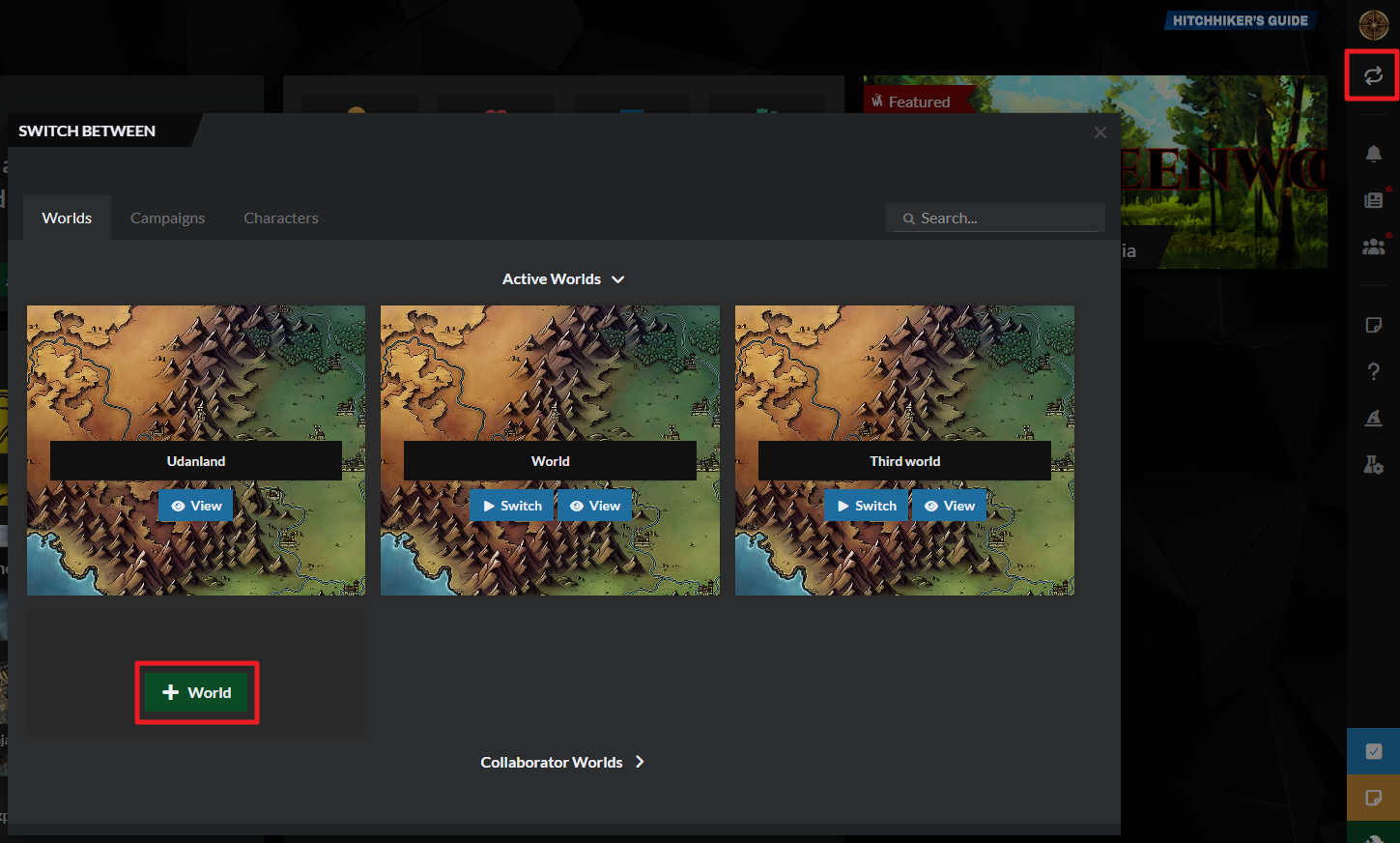
- Click on the switcher at the top of the right sidebar.
- In the "Worlds" tab, find the "New World " button and click it.
Need more help?
If you don't see an option to create a new world, learn how to enable worldbuilding features.
How to create a world on World Anvil.
1. Decide what kind of LARP it will be
Before you start worldbuilding, you need to know what kind of worldbuilding you need; and with a LARP, this is often related to logistics and space! If you want an epic medieval fantasy LARP that replicates an entire city, you'll need... well, a town! Or at least a space big enough to set up enough tents to pretend there's one.
If you're reading this, you probably have a pretty good idea about the kind of LARP you want. But remember that, while many LARPs are medieval-themed, they don't have to be! This is important not only for aesthetics and worldbuilding, but also for logistics. For example, medieval LARPing will usually include a bigger focus on combat than a vampire-themed game, which might be more focused on investigation. This will change not only the sort of space you need, but also the props you'll need and the rules you'll implement.
2. The Worldbuilding 101 course
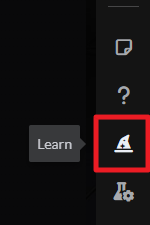
Some LARPs do more worldbuilding that others, but all have at least some—and if you're here, you're probably a fan of worldbuilding! If you've never built a world before, we recommend you take our free Worldbuilding 101 course! To access it, log in to World Anvil and click on the wizard hat icon on the right sidebar:
This course will walk you through the first steps building your world. When you finish the course or feel like you want to keep going, you can skip to step 3 of this page!
Bonus action: use the meta
If you didn't follow the "How to Start Worldbuilding" course, you might want to check out the Worldbuilding Meta!
On World Anvil, “worldbuilding meta” is your setting’s basic information—like its DNA. It's a place to record the behind-the-scenes stuff your players might never know (or might learn much later), like themes, core conflict, and inspiration, and it's a great way to keep you on track and motivated long-term.
Click the following button to learn more about this, or skip to the next section if you just want to start writing articles!
Why create a Worldbuilding Meta?
The Worldbuilding Meta forms a solid base for your worldbuilding. If you get stuck preparing your next game, visit it to renew your inspiration and motivation!
If you’re building a new LARP setting:
Fill in the meta to start your setting on a strong foundation! Establishing these big ideas will help you define what’s unique and compelling about your new setting.
If you already have your own LARP setting:
Use the meta to refine your concept more clearly! It’s a great diagnostic tool to help you articulate your vision. It can also inspire you to fill in areas you hadn’t thought of before!
If you’re LARPing on a pre-established universe:
Many pre-established universes are HUGE - with many themes, areas and options! Use the meta to help you focus on a specific area. Hack-and-slash to espionage & intrigue, what kind of game do you want to run?
To create your world meta:
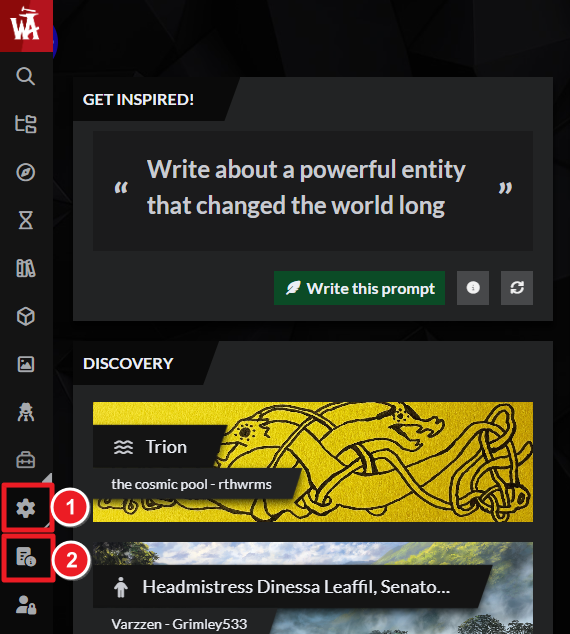
- Click the gear icon at the bottom of the sidebar, and then the icon, as shown below.
- Fill in the tabs and answer the questions, and remember to click save when you’re done.
- Write in short sentences and bullet points (believe me on this one—it’ll be so much quicker to reference later!).
Want more help? Then check out these resources:
How to fill in the Worldbuilding Meta on World Anvil
Build the basics of your LARP setting
Now you have the big concept of your setting, you’re ready to start creating your articles!
Articles are the core of your world on World Anvil. Think of them as Wikipedia entries. They have structured information about a specific topic. They can be as short or long as you want, and they’re linked to other related articles. World Anvil is specialized for worldbuilding, and so are articles! Different templates include special features like dictionaries (language template), family trees (character template) and diplomacy webs (organization template).
Depending on the nature of your setting you’ll need to approach articles in a different way:
Creating your own (homebrew) setting:
Start your articles from scratch and write as much (or as little) as you want!
Follow the steps below to create them!
Using a published* setting:
Create articles for any content that you add to the setting, or for anything that you change. You can also create summaries for quick reference.
To create a new article:
- Click the green Create button at the bottom right corner of any page. You’ll see a grid of different article templates:
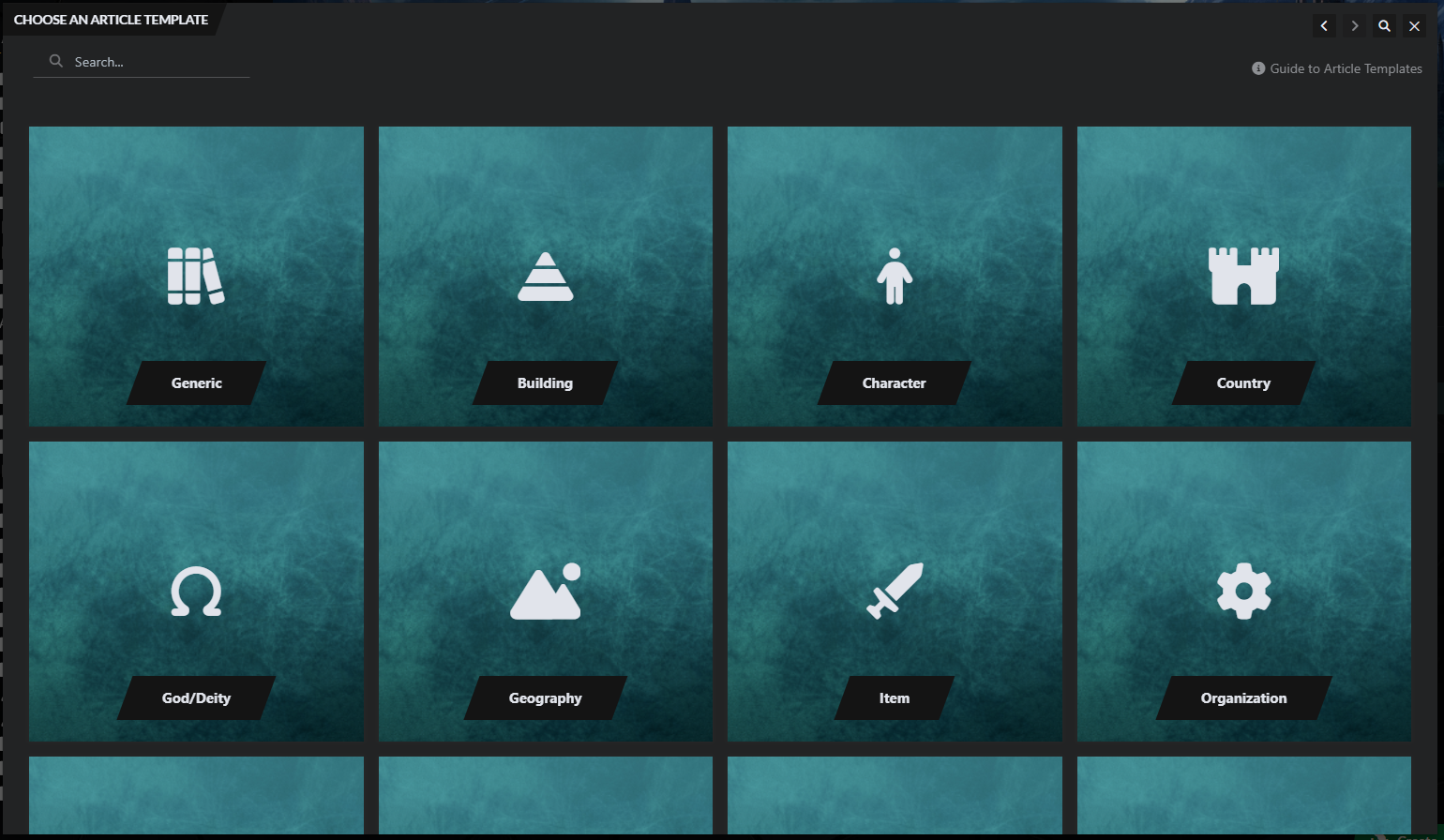
- Choose the article template that best fits your article.
- Write the title of the article and start worldbuilding in the text area!
Need more help?
Learn more about editing articles from these resources:
Lesson 1 of the Beginner Tutorials: Get Started with Articles
How to link articles with the mention system
How to customize your article's layout
Guide: World Anvil Article Editing Interface
What articles do I need to create for my LARP?
This is very individual, but here’s a method we recommend:
- Re-read through your Meta from the previous step.
- List the major people, places, things, and concepts in an Article, the Notebook, or the ToDo list.
- Expand each concept into a brief Article (even just a few sentences) using the worldbuilding templates.
- Link them together where you can.
Keep in mind the logistical constraints of your LARP! You will have a limited area, so especially when writing about locations, make sure they fit the real-world space you'll have.
Once you’ve created these, start thinking from your players’ perspective! What will they interact with, and in what order?
Bonus Action: Bringing in your players
Once you’ve built the basics, get in touch with your players. Depending on how you want to run your LARP, their characters might influence your game’s details before it begins. Their backgrounds, motivations and origins can enhance worldbuilding and storytelling. Include them in the process!
You’ll probably be creating two kinds of articles:
Notes for-your-eyes-only:
Just for your personal reference. Write your articles in bullet-point lists that get straight to the point. This makes it easy to reference important information while running the game.
Creating player resources
For articles for your players, layout, readability, and good prose are more important. Good quality handouts increase player immersion. They’re worth some extra time and effort!
In both cases, start with just the basic information and don’t succumb to Worldbuilders Disease. You can always add more details as your game progresses!
4. Organize your world
LARPs usually involve a very large number of people, so if you don't want to be flooded by questions from confused players, you need to keep everything neat and tidy! You can organize your articles with categories.
A category is like a folder that contains articles. Use them to group articles by topic. You can also nest categories to create a tree-like structure for your LARP setting.
To create a category:
- Click the green plus button at the bottom right corner of any page.
- Select category in the list.
- Give the category a name and press Shift+Enter to save it.
Other worldbuilding tools (optional!)
At this point in the workflow, you should have a good handle on your LARP setting. Congratulations! You’re almost ready to start putting together the actual event!
If you want to flesh out your setting more, these tools might be helpful!
- Interactive Maps: upload your map and make it interactive, with pins, zoom, and other tools. You can use this for in-world maps, but it can also be a great way to present the physical play area and all of its different areas!
- Timelines: useful for decoding and helping players understand relevant events in your world, past and present. If player action affects subsequent games, this can be a really fun way to keep track of the game's history for your players too.
- Visual themes (Guild-only): give your players the look and feel of your world with visual themes! We have dozens to choose from, and you can even make your own.
- Chronicles (Guild-only): powered-up timelines! Chronicles merge maps and timelines into a single tool, so you can see when and where everything happened! It’s a must if you have complex lore, or you’re tracking the movements of multiple factions.
- Family trees (Guild-only): display an interactive family tree of your characters. Really helpful for political intrigue, family drama, and tracking royal or magical lines!
Quick recap!
By now, your world should now have:
- A meta document to keep a solid foundation for your project.
- Some articles with information about your world.
- A basic category tree to organize your worldbuilding.
- Maybe a map, timeline or other visual aid for your players!
Now that your campaign setting is ready, it’s time to start organizing the event itself!
5. Gather a team
You can't run an entire LARP on your own, you'll need help! There are two types of staff you might need:
- Logistics: You might need to set up props, move people around the place, manage tickets, homologate weapons, etc. ("weapon homologation" means making sure the weapons won't hurt anyone!)
- Playing characters: If your LARP requires NPCs, you'll need people to fill these roles! You could also set up NPC shifts for players, but that will also require someone from the team to manage.
You can use World Anvil to coordinate these helpers. For example, you could have an article with a list of props, another with the weapon homologation rules, and individual articles describing each NPC's personality and backstory. Most of these articles should be visible to the LARP team only, so use subscriber groups to control who has access to what!
6. Plot the game
Some LARPs have a strong focus on plot, while others are more player-driven, and others are almost fully sandbox. Still, you need a basic scaffolding for your players to build upon! Even if your LARP is a sandbox, you'll need to think about the various activities, events, and quests that will be available—if that's what you're going for, you could use a private map to plan, since events will be tied to specific places.
Are you a written planner?
Use the Plot template to outline your Master Plan! This article template includes prompts and sections to help you plan your game structure!
Are you a visual planner?
Prefer to sketch it out? Whiteboards are a blank canvas you can use to create anything, including the structure of a game session! Draw connections, show forking narrative paths, or if/then flowcharts.
Using the Plot Template
If you’re preparing a campaign, create a new Plot article and start by outlining the basics: what's the main conflict, who are the antagonists, and what's the role of the players?
If your LARP is made of one-shots (i.e. games don't form a continuous narrative), use the same article to plan the details of the game. If your LARP is a campaign, use this article for the overall master plot, and create additional Plot articles for each game, to keep everything more organized.
In the specific plot articles, open the Prompts section and use the Parent Plot drop-down to select the Master Plot article. This will keep plots easier to find and reference as the game progresses.
Important: choose your parent plot carefully! If you accidentally create a logic loop, you will break space and time (and also World Anvil). Don't choose a child plot as a parent plot.
Using a Whiteboard
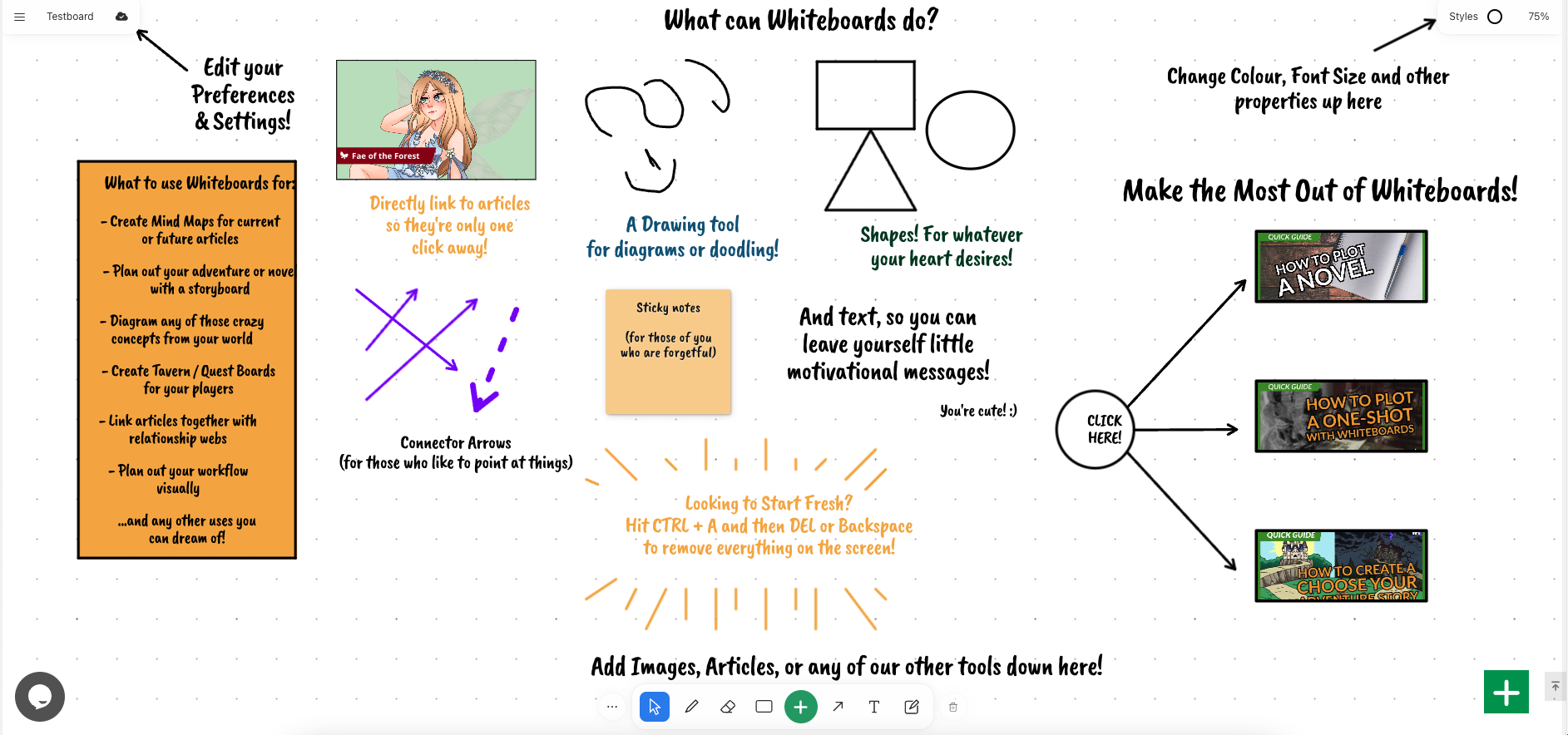
Follow these steps:
- On the left sidebar, expand Advanced Tools and open Whiteboards (Guild Only).
- Create a new Whiteboard and give it your game’s title (you can change it later).
- Use the drawing tools at the bottom of the screen to create the general outline of your game.
You can also use Whiteboards to have a visual representation of the different factions and characters of your setting. Make sure to create a new whiteboard for each individual game too—having an entire campaign in a single whiteboard may get confusing!
Player factions
Depending on the amount of players you expect, you can create player factions too. This is a great opportunity to create drama and intrigue between the players, and to allow them to have a greater influence over the plot, as they can serve as each other's antagonists! You can create faction-specific lore on World Anvil, and use subscriber groups to control who can read it.
7. Plan the game rules
Some LARPs are more rules-heavy than others, but any large gathering of people will need a set of etiquette rules. Additionally, if weapons are a part of the game, make sure you have safe weapon homologation rules. Finally, if you use non-intuitive systems like magic, or specific mechanics for injuries and death, you will need to write them down too.
Create a Generic Article and write all the rules. Make sure they're clear, concise, and have examples wherever needed. Then, link this page from prominent places, such as the world homepage and communications with the players. If you're a Guild member, use the global footer or another global announcement spot for this.
8. Plan the location and schedule
This is a mix between fiction and real-life logistics. Look at the area you'll have available for the game, and map each in-world location to a specific place. In other words, decide how you'll turn a mundane space into a fictional land of wonder (or terror)!
Then, establish a game schedule. When are players supposed to show up, and does the game continue overnight? When does the game end? Write all of these details into a Generic Article. You can also run scheduling discussions with discussion boards.
Writing these details down is a very important step, since you don't want your players to go to the wrong place, or to show up on the wrong day! Show the page to someone else to ensure everything is clear.
9. Put together a good player introduction
This is a single document that has all the information a player needs to get started. It should include the game rules, a short introduction to the in-world lore, and content warnings. Content warnings are important in any collaborative creative activity, but they're even more essential when the activity is being acted out in real life!
Ensure all players see and read this page—ask for confirmation, if you need to. For example, you could set up a self-assignable subscriber group to know which players have read them and which haven't. Learn more about self-assignable subscriber groups
10. Plan a communication system
You need to find a way to communicate with your players during the game! The system you choose will depend on a number of things, but an important one is how immersive you want the game to be. For example, if you're running a medieval LARP, are visible electronic devices (like a phone or a smartwatch) allowed? If they aren't, you'll need to think of a system that isn't based on phones! Set up clear physical meeting points for each event, and for players to talk to you and your team if they need to—you can use an interactive map for this!
For in-game communication, consider QR codes (if they're not too immersion breaking) and passwords (which you could disguise as setting-appropriate "magic words"). Using password-protected articles, you can give your players tidbits of information only after they complete a quest, reach a location, or get an item!
11. Start the LARP!
This is the time everyone's been waiting for! Have fun and enjoy it, but remember to keep track of what players do. You'll need to know to prepare the next game!
Post-LARP debrief
When the game is over, meet up with the entire LARP team to share your experiences. Find opportunities to improve and make the next game even more amazing, and have everyone share how the game plot has progressed from their respective points of view. This can also happen online, such as in a discussion board!
Encourage player journals
No one can be everywhere at once, so encourage players to write either in-character or out-of-character session reports (or both!). This will allow everyone to piece together what happened during the game, get excited for the next one, and become more immersed into the story. To do this, you can add your players are Writers in the world and have them create a session report article.
Create a session report
Based on your own experience, as well as what the rest of the LARP staff tells you, write a Session Report article with everything that's happened. Include pictures from the event, and end with a tease of what's to come in future games. Then, share it with all players so they can get excited for future games, and learn about any events they may have missed.
Congratulations! You've run your first LARP with World Anvil! Rest for a bit, and if you enjoyed the experience, get ready to prepare the next one. If you've built the lore in World Anvil, update the way the world has changed, so next time your players will see their agency enacted in the setting! This is a good way to give your stories deeper meaning and impact.



