Welcome to the World Anvil workflow for serial fiction writers! This workflow will help you bring your serial fiction stories into World Anvil.
World Anvil helps you with every stage of writing, from creating your setting and building your world bible, to outlining and plotting your ongoing story, to publishing and sharing your work with your fans and communicating with them!
Just a heads up that this workflow is just ONE way to use World Anvil; once you've got the basics, try things out and see what works for you. You don't have to use every single tool on World Anvil to tell a great story - use the tools YOU need for YOUR writing and worldbuilding!
If you're writing a traditional novel instead of serial fiction, check out the Writer Workflow instead.
Contents
Set up your account
If you don’t already have an account:
- Navigate to worldanvil.com/register to create your account.
- Enter your email address, username, and password, then click Register.
- Complete the short account set up process!
Pro Tip: Make sure to select the "Writer" option during account creation! If you didn't, you can enable writer features under account features.
Create your world
Now that you have an account, create your world!
On World Anvil, a “world” is the setting of your story. It could be anything from a single city (like Camorr, from The Lies of Locke Lamora), to a continent (like Middle-Earth), to a galaxy far, far away (like Star Wars), or even a whole multiverse (like the Marvel multiverse). As long as it works as a single setting for your stories, it’s a world!
Pro Tip: If you’re writing and running RPGs in the same world setting, make it a single world on World Anvil!
Why create a world first?
No matter how deep you want your worldbuilding to be, you'll be constantly referencing it as you write. And you'll be writing Serial Fiction, which means that your world must stay consistent throughout all the arcs you'll be writing! Setting up solid foundations now will be extremely helpful when you're dozens of episodes into your story.
Steps to create a world:
- Click on the switcher at the top of the right sidebar.
- In the "Worlds" tab, find the "New World " button and click it.
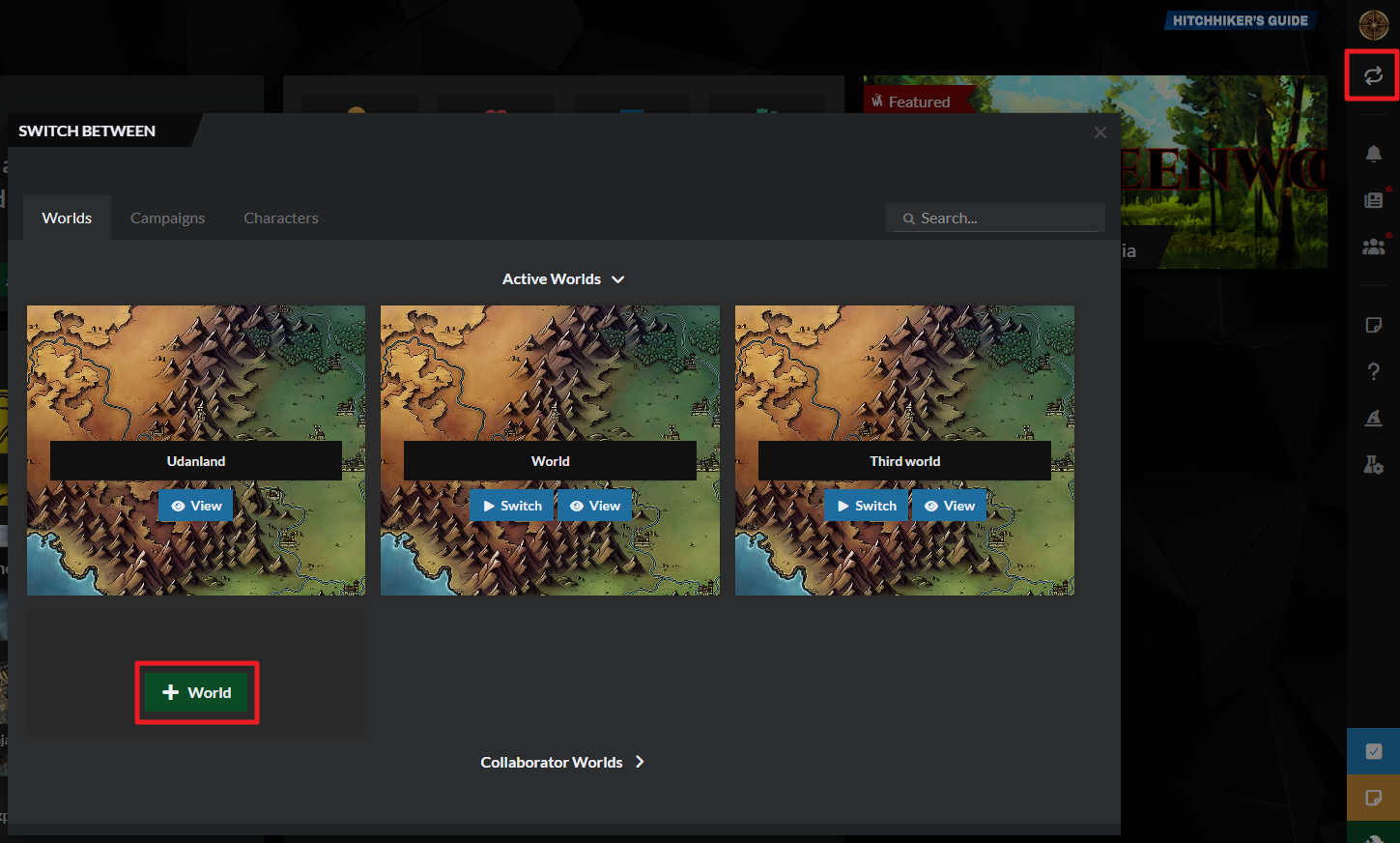
Need more help?
If you don't see an option to create a new world, learn how to enable worldbuilding features.
How to create a world on World Anvil.
1. The Worldbuilding 101 course
If you've never built a world before, we recommend you take our free Worldbuilding 101 course! To access it, log in to World Anvil and click on the wizard hat icon on the right sidebar:
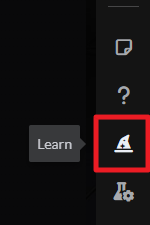
This course will walk you through the first steps building your world. When you finish the course or feel like you want to keep going, you can skip to step 2 of this page!
Use the meta
If you didn't follow the "How to Start Worldbuilding" course, you might want to check out the Worldbuilding Meta!
On World Anvil, the Worldbuilding Meta is a series of questions that help you define fundamental aspects of your setting - things like the magic system, the unique geography, the people who live there, and the big stuff that's happening. It also helps you dig into the more literary aspects, like genres, themes, mood and inspirations.
And it's a great way to keep you on track and motivated long-term - which is ideal for serial fiction writers working on literally endless stories!
Most serial fiction genres involve a “system” —a set of rules that are different from our world. In LitRPG serials, these are the game-like elements and mechanics, such as progression, leveling, stats or skills, classes, and achievements. In the World Anvil meta, that would be covered in the Rules of Your World section - so be sure to include them there!
Bonus Tip: If you're still having a hard time understanding the idea of a "system," and you’re not familiar with LitRPG stories, think of books like The Hunger Games or Divergent, whose protagonists defy a strict class system with little to no social mobility to upend their entire world order. The most popular plots in Serial Fiction are stories like this, about characters beating, transforming, or breaking the system against impossible odds .
Click the following button to learn more about the meta, or skip to the next section if you just want to start writing articles!
Why create a Worldbuilding Meta?
The Worldbuilding Meta helps you define what's important and true in your setting. It's the core information that fuels everything else you worldbuild. If you get stuck preparing your next story arc, visit it to renew your inspiration and motivation!
If you’re building a new setting:
Fill in the meta to start your setting on a strong foundation! Establishing these big ideas will help you define what’s unique and compelling about your new setting.
If you already have your own setting:
Use the meta to refine your concept more clearly! It’s a great diagnostic tool to help you articulate your vision. It can also inspire you to fill in areas you hadn’t thought of before!
To create your world meta:
- Click the gear icon at the bottom of the sidebar, and then the icon, as shown below.
- Fill in the tabs and answer the questions.
- Write in short sentences and bullet points (believe me on this one—it’ll be so much quicker to reference later!).
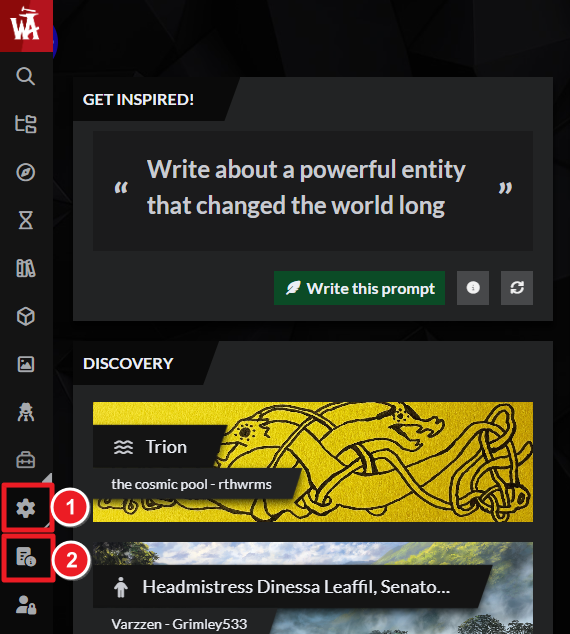
Want more help? Then check out these resources:
How to fill in the Worldbuilding Meta on World Anvil
2. Start Worldbuilding
Your world is now set up—time to start creating articles!
Articles on World Anvil are the core of your worldbuilding. Think of articles as Wikipedia entries: they have structured information about a specific topic, they can be as short or long as you want, and they’re linked to other articles. For authors, this is often called a World Bible.
World Anvil is specialized in worldbuilding, and so are the articles—use the different templates to get topic-specific features like dictionaries, family trees, and diplomacy webs.
To create a new article, follow these steps:
- Click the green Create button at the bottom right corner of any page. You’ll see a grid of different article templates:
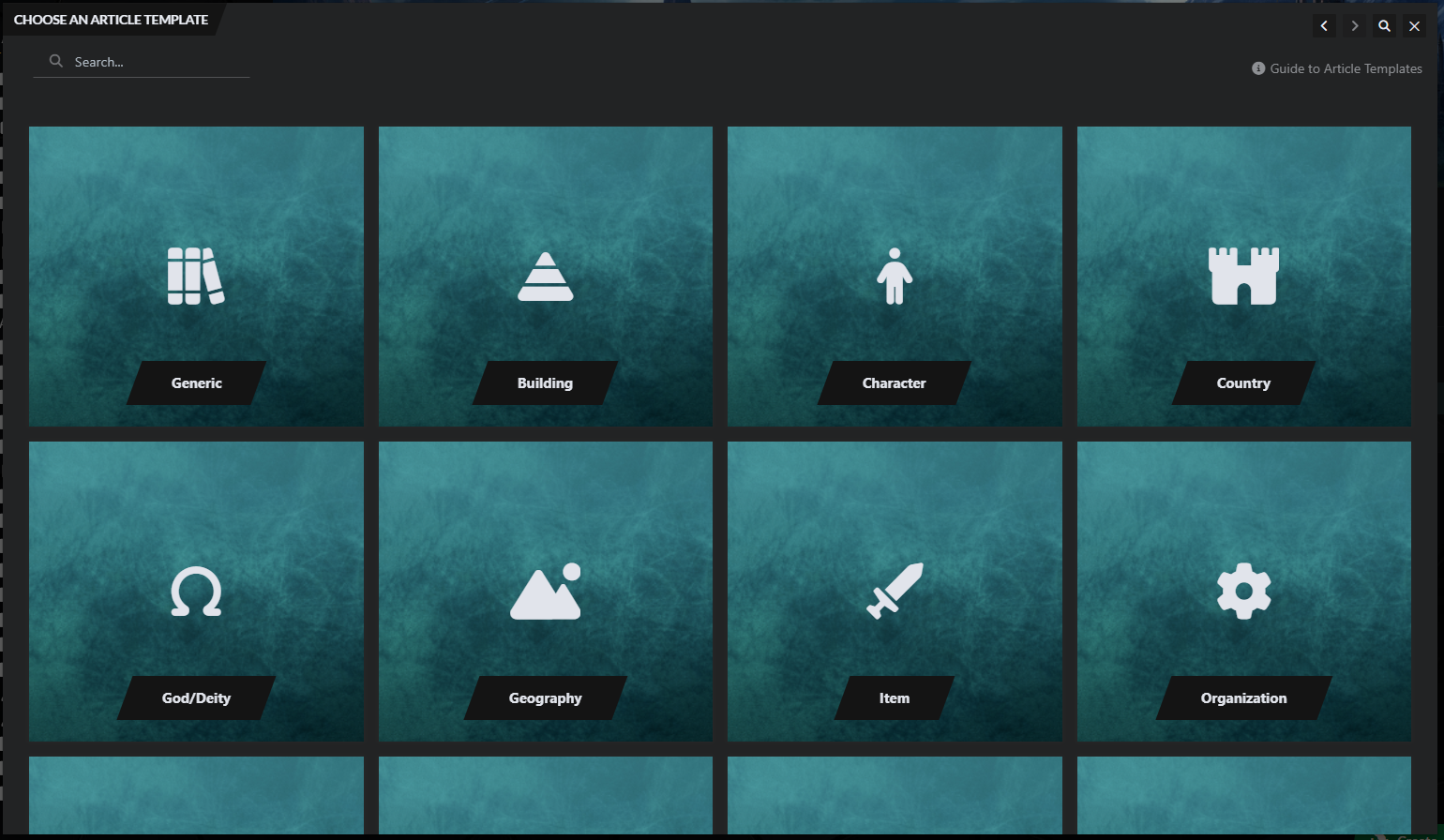
- Choose the article template that best fits your article.
- Write the title of the article and start worldbuilding in the text area!
Here are some resources if you want to learn more about editing an article:
- Full guide to the article editing interface
- How to link articles using the mention system
- How to customize your article’s layout
Which articles do I need to create for my story?
The articles you need depend a lot on your world, and the kind of story you're telling!
- If you're starting from scratch, start with what you know about your story and setting—often for writers, that's a character. Use the prompts in the character template to expand their friends & family, the places they grew up and studied, and their experiences so far. All of those aspects can then become articles (characters, settlements, organizations, cultures) in their own right!
- If you following the Worldbuilding 101 course, you'll already have a collection of starting articles for your setting! If you followed this path, we recommend creating some characters next.
- If you've filled in the Worldbuilding Meta, start by creating articles for the important rules of your world (natural law template), and the important peoples of your world (culture or organization template). Then expand your world by creating articles about important characters, places, things, and concepts—often these will be the Proper Nouns (names) in your meta.
Once you’ve created those, start thinking from a character perspective—that might mean going straight to creating character articles, or beginning with major cities (Settlement template) or cultures (Ethnicity template).
The amount of worldbuilding you do before you start writing is unique to each writer! Some prefer developing a strong setting before they write, others prefer to discover their world as they go. As always, do what works for you, or experiment with your process!
3. Organize Your World
So, you have at least a handful of articles, but as you write more episodes of your story, your world will grow really quickly! To avoid losing track of your own worldbuilding, organize it with categories.
A category is like a folder that contains articles—use them to group your articles by topic. You can also put categories inside other categories to create a tree-like structure for your worldbuilding.
Follow these steps to create a category:
- Click the green plus button at the bottom right corner of any page.
- Select category in the list.
- Give the category a name and press Shift+Enter to save it.
If you’re looking for some advice to create a category tree, check out our Tips to come up with a category tree. And for more information on categories, check the guide to categories.
4. Let's Get Plotting!
For serial fiction, you will be thinking in terms of character arcs and cause-and-effect chains to define your plot. You should know roughly how the main arc will go, and the basics of a few additional subplots. These can be side-quests for the main character, or personal arcs for other characters. By sprinkling in new subplots and complications as you go, you can extend the story while giving readers a sense of progress.
It's not necessary to go into great detail in your plot article—just hit the main highlights or story beats. Planning how to end the main arc in advance is also a good idea. It will be really useful whenever you decide to end the story—even if that's sooner than you planned.
So, here's how to do this on World Anvil:
- Create a Plot article and call it "master outline" (or similar).
- In your master outline, develop the premise of the story, the main characters, and the end you've planned.
- Create a new Plot article for the first arc of the story and plan it out in detail.
- Keep your master outline updated like this:
- Add links to each new Plot you create (for each arc).
- Every time a major event happens in the story, add it too. This will create a "retroactive outline" that you'll be able to use to reference what happened in past episodes without having to re-read everything all the time.
- You're ready to start writing!
PRO TIP: Unlike traditional novels, serial fiction episodes often end after a new scene begins, to keep readers hooked. The next episode can start with the resolution of that scene, then move on to a new one. Each major step forward in the plot should introduce a new complication, which you'll then use to plot the next few episodes. Keep this in mind when planning the next arc!
5. Time to Write
The best way to write serial fiction on World Anvil is with Manuscripts, as they will let you publish your story episode by episode rather than all at once (learn more about Manuscripts). We'll talk about publishing in the next section, but remember that with serial writing you'll start publishing the first episodes before you have written the full story!
Before you start writing, decide how often you'll publish new episodes (weekly, biweekly, daily...). Usually in serial fiction, the longer your readers have to wait between episodes, the longer they expect the episodes to be! If you promise a new chapter by a certain date, try hard to deliver that. Your fans will be somewhat understanding, but you can lose reader trust if you keep missing your deadlines!
Don't plan for very long episodes (unless you're very prolific) for each installment of your serial. Think of each episode as a snack for your readers, rather than a full meal! Short episodes published frequently perform better than extended episodes your readers will have to wait for. And as a bonus, you get your fans in the habit of coming back to find your story.
As you plan your release schedule, make sure you include editing time when calculating how long it will take you to finish an episode. We also recommend always having 2 or 3 weeks worth of episodes banked up and ready to release, in case you hit a block and need to put in extra time!
Setting up your Manuscript for Serial Fiction
Manuscripts are organized in chapters and scenes. Treat each chapter as an episode, and use scenes to further divide up the chapter for your own reference. Due to the nature of serial fiction, your episode will often end before the last scene is resolved. That's ok! Manuscript Scenes are only for your own reference
You'll often end up with episodes in various states of revision, from "first draft" all the way to "published". To see the state of each episode at a glance, use color-coded labels. The labels you use will depend on your own writing and editing process, but it's a good idea to have labels for at least "first draft", "edited", "ready to publish", and "published".
6. Publish Your Writing
Once you have enough episodes ready for 2-3 weeks and at least 3-5 arcs outlined, it's time to start publishing! Check the Guide to Manuscripts for instructions on how to publish your story chapter by chapter.
Make your story stand out
There are a few things you can do to help get more eyes on your work! These include using relevant genre tags, adding an appealing cover, and creating a compelling blurb description for your story. These can all be found on the Manuscript Basic Settings page, under Basic Details.
The suggested size for your Cover is 500 x 700 pixels. You can create a cover in Canva or your preferred image editing software, and upload it to your images. Make sure the title is clearly legible even at a thumbnail scale. Visit the Manuscripts Community Discover page to see what those thumbnails look like.
The Manuscript Backcover Summary field is where you’ll enter your story’s description blurb. Think of this as the summary description on the back of a paperback. It should tease the story without giving away too many details. Make sure you’ve included the information that will help your ideal reader find the story - things like tropes, genres, and unique elements.
The Genre tags field in Manuscripts covers more than the standard bookstore genres - or even ebook store categories. These tags work more like hashtags on social media, including keywords about different story elements readers might be seeking. This might be genre (like “epic fantasy” or “lit rpg”) or tone (“cozy” or “humor”). It could also be elements readers want in a book, like “male protagonist,” “slice of life,” or “witches.” Again, checking out examples on the Manuscripts Community Discover page can be helpful.
This is also where you can add NSFW or content warning tags - avoiding the wrong readers can be just as important as finding the right ones! Start typing the keywords you want to include, and the existing ones in our database will pop up.
Taking a break
Writing multiple episodes ahead means that if you ever need to take a break from writing, you have some wiggle room to keep publishing for a bit. However, at some point, you might want to take a break too long to cover with banked episodes. When that happens, it's very important to announce this to your readers! Encourage them to provide feedback, check out your worldbuilding, or read spin-off or bonus stories if you have any. If you don't announce a break, your readers might think the story is abandoned, and that's not what you want! Here's a way to announce a break:
- Make a community post on World Anvil (and anywhere else your readers will see) to let your followers know.
- On Manuscripts, either edit your Manuscript's synopsis or the end of your last episode to mention that you're taking a break. This is important because not all readers will follow your socials (and you might get new readers during the break too!).
7. Rinse and Repeat!
This is serial fiction, so now it's time to repeat steps 4-6 until the end! When you feel it's time to close the story, use the ending you planned initially and you'll be done.
Building a Community
Building a community is a great way to ensure your readers stick with you as you write and throughout any breaks you might take. For serial fiction writing, publishing side stories, character profiles, and access to (some of) your worldbuilding are great ways to engage your readers and make them more dedicated to you! You could, for example, hide different information depending on how far along a reader is in the story. Check the Workflow for Keeping Secrets for more information on how to do that.
A very important part of community building is involve your readers in the story. Encourage them to leave comments with their predictions and favorite scenes. You can even ask them what should happen next and base your future planning on their comments!
You might want to build a place for your community hang out in as well. Many Anvilites use Discord as their community's main hangout space; check the Discord workflow for details! You can also host your community on World Anvil through discussion boards. Use these community spaces to publish exclusive content if you want to encourage your readers to join your community!
If you use Patreon, Ko-Fi or any other crowdfunding platform to support your writing, or are charging for part or all of your work, check our workflow for professional worldbuilders! World Anvil has many features you can use to reward your backers and customers, and this workflow will teach you how to best integrate World Anvil into your monetization.
Other Useful Features
We’ve kept this workflow as lean as possible, but World Anvil has many other features that can be useful for a serial fiction writer! Depending on what kind of world you’re creating, and the stories you write, they might all be useful (or maybe none of them)!
- Family trees: create interactive representations of your stories' families.
- Maps: Interactive maps are great features if you're building a community, as a good map can be really fun to explore!
- Timelines: This will be useful for both you and your readers, as when you're several episodes into the story, it will be really handy to check what happened early on.
- Diplomacy webs: see the relationships between different factions in your world at a glance. Very useful if you have many different factions in your story.
- Content trees: some kinds of information are better displayed in a tree-like structure, like a hierarchy or an evolutionary tree. Content trees let you do that.
- Calendars: knowing the months and days of your world is always useful, regardless of the kind of story you’re writing.
- Secrets: if you’re sharing parts of your world with your readers, you can use secrets to keep some information private or only available to certain people. Check the workflow to keeping secrets for more options to keep content private or hidden.
- Random generators: use our library of random generators to generate names, locations, writing prompts, and more—check them out here. You can create your own custom random generators for your world too, which are great for fan interaction!



