Available to all Guild subscription tiers. Upgrade here.
On World Anvil, global posts is a great way to share your creative work, excitement, advice and inspiration with the rest of the community! You can also interact with others by reading, commenting and liking their posts! Here's everything you need to know about global posts.
Contents
Community post guidelines
Here are some things that you should always keep in mind when posting globally:
- Don't spam! Try to keep global posts to no more than one per day, and don't promote commercial projects. Spamming is not good and it might very well get your ability to post globally revoked, and nobody wants that!
- Sage Commercial promotion. Sages of the Guild may promote their commercial projects once per month; all such projects must be related to World Anvil, worldbuilding, or worldbuilding-adjacent activities. To promote a project more than once per month, you must fill out the promotion request form, which you'll find in the Sage-only Professional Portal.
- Follow our guidelines. Make sure to always follow our Etiquette and Terms of Service.
- Be a force for good! Be creative and helpful, announce things that the community will be excited about or share resources that make everyone's worldbuilding life better!
- Embrace the community. Be a good sport, post helpful things globally and you might see your post pinned on the top for everyone to see! Reply to other people’s global posts, and you’ll soon make friends and see more interaction on your own too.
How to create a global post
Here's how to create a post:
- Open the Community portal in the right side bar.
- Write your post! You can use formatting by typing / to open the slash menu.
- (optional) Add an image or article link using the corresponding buttons under the text box.
- When you're happy with it, click Post.
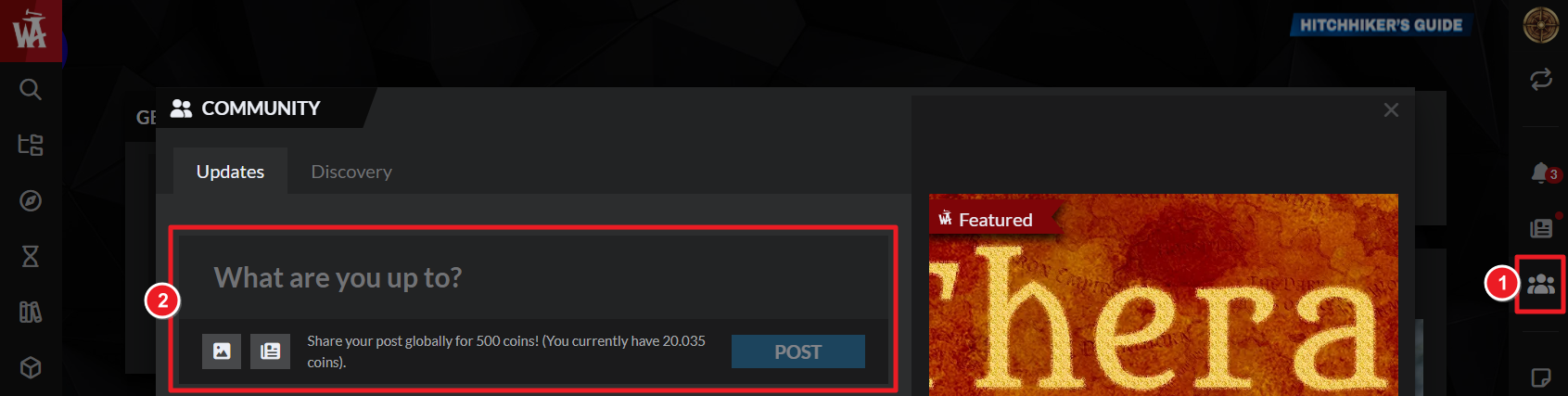
Global posts are a guild perk and cost 500 Anvil coins (which you earn by simply logging in to World Anvil each day!).
How to edit your global posts
Besides text, there are many ways to enrich your posts and make them more reader friendly! If you're making longer posts, here are some recommendations:
- Add images to make your posts more interesting to look at.
- Add links to your articles to make your worldbuilding more discoverable.
- Add links to the rest of your work too!
Hashtags
You can also add hashtags to your posts! Hashtags will make it easier for others to find your global posts and you can also browse other people's posts more efficiently. Here are some tips:
- Event hashtags. There is a new event, challenge or competition every month on World Anvil! Use the event specific hashtags when making posts related to them.
- Capitalisation. We recommend you use a capital letter at the beginning of each word that makes up the hashtag (aka CamelCase). For example, #SummerCamp.
- Trending hashtags. You can find the currently trending hashtags at the top of the community stream.



