

Timeline Guideline
Why this?
World Anvil has a shitty way of handling its timeline system. Here is a little guide as to how we make this work out. Chaotic.Guide to the UTD
Universal Timeline Date (UTD) is the global timeline date notation. This one is seperate from the Timelines menu, and can be found in the World Configuration menu.
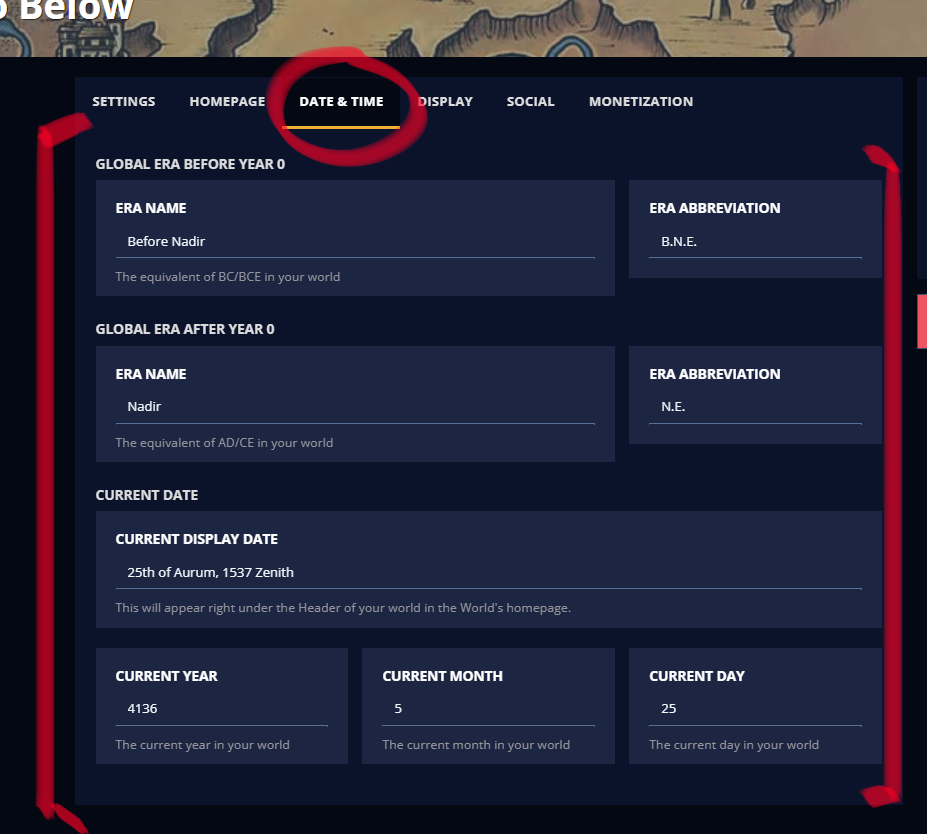
Whilst this menu is seperately listed from the Timelines, it does majorly affect them. When you create a Timeline, an Era, or an Event, the menu will ask for a startdate. This date ALWAYS has to be listed in UTD. Even when it doesn't say so. Something being a Master Timeline does not affect how you list an event's date! To smoothe this out, we have decided to have UTD be Nadir, since that is our Master Timeline. This brings me to the Anatomy of the World Configuration Date&Time Menu.
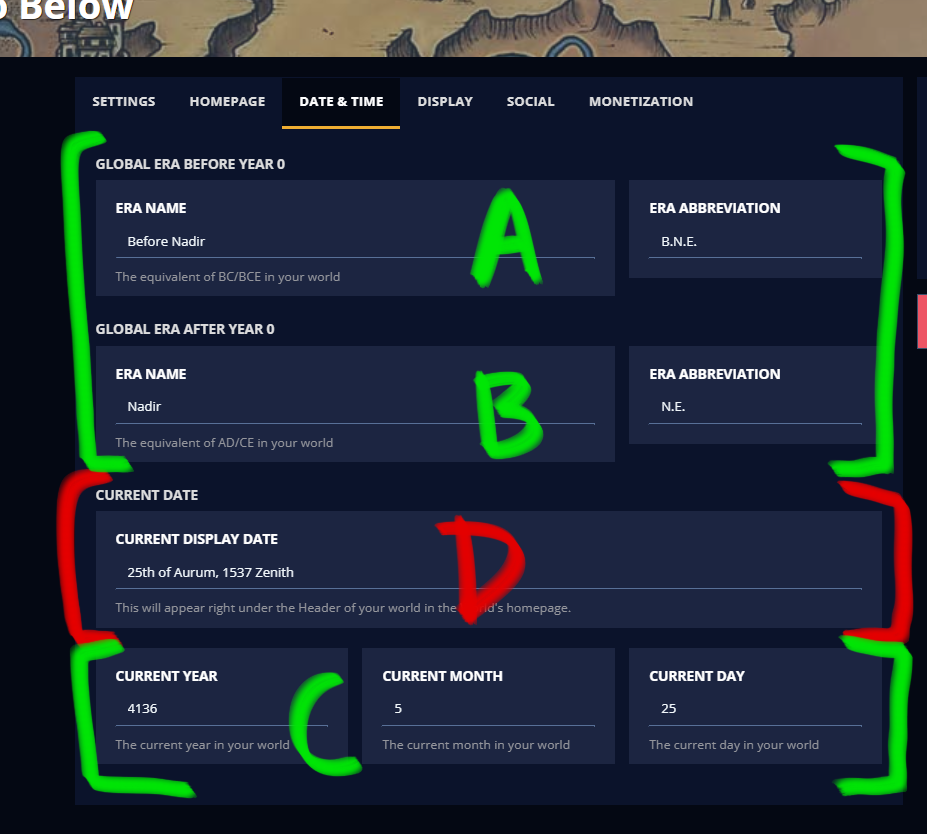
A.
This bit, the "Before Year 0", is a bit of a bitch to work with. You can't tell it that it ends its counting before year 0. Basically, what it does, is this:
Now I hear you wonder, what is the issue with this?
Please put a pin in that one.
B.
Put your Master Timeline name here. Don't ask questions. Just do it. If the Master Timeline is hidden to characters, do not worry. They don't have to see it, that can be accounted for by menu settings and some fendangling, which will be touched upon in just a second.C.
List your current Year/Month/Day notation, fitting the UTD format (So your Master Timeline count). Do not indulge in listing it as a count of something the players know. As said, this will be accounted for. Speaking of which, this brings us to the last letter:D.
This is a handwritten override of the Current Date that was listed in Point C. This way, you can flavour the way it's portrayed, and as such, hide it from the players if you want to. It is recommended to use this function, even when you don't have a special/differing date notation, because otherwise it lists the date in a flat numbers format (without any month names or anything). Also, without this, the current date/time will not display on your world homepage. When you place special code that calls for the current date/time somewhere with a BBCode command, it will still make use of this handwritten override. Whatever you do, put your flavourful shit here!Pro-tip!
You can easily change your current date by clicking on it in the Sidebar Menu in the Dashboard!
Guide to Timelines
Master Timeline
The Master Timeline is what we are going to set up first. Create a Timeline in the Timelines Menu (be sure not to accidentally click on Create a Chronicle, because that one is at the top of the page). Then, in that menu, make sure to open up "Show Advanced Options" so you can actually create it properly and list it as a Master timeline.Once you have created it, we will create two Eras to start out with. The first will be for everything BEFORE the count of history. This PRELUDES our UTD. We're going to handwrite some shit here, because you can't make the system work in a way you'd think it would work. Some settings:
- Start Date Put some random, extremely negative value here. We went with -100000. Basically, we want to make sure that whatever event listed BEFORE the beginning of time/date notation automatically falls into this, and doesn't Orphan itself.
- End Date Put this to -1!!!! We do not want it to cross streams with our next Era, which will start at the year 0.
- Alternative Display Range We are going to make hefty use of this one. Put something in there like "∞ to 0 N.E." (N.E. in this case, stands for Nadir [Era], which is the name our world gave to the first date/time notation Era. Put whatever your world uses here). Why do we do this? Well, add that onto our earlier pin. We will come back to it, pinky promise.
- Things to Check "This is the first Era of the World", "Restart dates at 0". Leave everything else unchecked.
Next will be an Era to cover the CURRENT Era.
- Start Date Put the start date at 0.
- End Date We are going to set this up assuming our Master Timeline just has a single actual Era (The previous one we set up is so events won't get Orphaned, but counts as a 'before the existence of time/date notation' kind of thing). Leave this field empty!
- Alternative Display Range Put a "0 [Era abbreviation] and beyond" here. Working with Nadir Era, we put "0 N.E." there, but put whatever you're working with.
- Things to Check "This is the current Era of the World", "Restart dates at 0". Leave everything else unchecked.
So, what we have set up so far, is a working pre- and post-Era to the year 0, which registers properly. The reason for this, is all our Handwritten Override stuff. Why is this relevant? Remember our pin?
the Pin
Earlier, we mentioned the way WorldAnvil thinks both the pre-history and post-history overlap on year 0. As such, when we create our Master Timeline, we can't have
As you can see, it threw "B.N.E." or basically, Before Nadir Era into both these notations. Not to mention, it did not, at all, want to eat the -100000 value. Funnily enough, there is a bug to be found here, namely, when using two minus-dates (so our -10000 and -1) in the Start and End date, it cancels eachother out and registers it as positives. Changing one to a positive does not smoothe this out, the problem sticks. Inverting dates doesn't change anything either, though that function even specifically states it doesn't work with negatives. Lastly, even putting the Date Offset to -1 does not solve this.
However,
Despite all these display issues, behind the scenes, it does want to eat these minus values properly. If we were to list an Event as some kind of date listed in those minus-dates, it will sort itself properly into that bracket. So, this is a workaround all-around.
Parallel Timelines
Now that we have our Master Timeline and our UTD set to overlap, we're going to touch upon the Parallel Timeline settings. When creating a Parallel, we are going to assume that the earliest possible point in time this one emerges, is year 0 of our Master Timeline. If this is not the case, please adjust the Master Timeline to contain the earliest possible options. Parallels should not have a wider range than the Master Timeline.Just like the Master Timeline, to make sure we don't Orphan any histories that you want listed in the timeline yet prelude the start of it, we gotta create a "Before" Era. The setting for the "Before" Era are as such:
- Era Abbreviation Our Parallel timeline is going to be called Zenith [Era]. Since we are going to work with minus-dates (as in, it's going to count backwards for us), it'd be most readible to have the abbreviation match the current Era. In this case, with Zenith [Era], that will be Z.E.
- Start Date Make the Start date your most recent date. For this example, our "Zenith" Era starts at 2590 Nadir. As such, our "Before Zenith" Era, needs to have a Start Date of 2589 (so the two Eras won't overlap).
- End Date Your End date should be 0. I know the End and Start date are inverted right now. I don't know why this works. Put it in like this for things to work. Don't ask. I don't have any explanation.
- Things to Check "This is the first Era of the world" "Restart dates at -1". Nothing else needs to be checked. Note: if you want there to be a time indication relating to the Master timeline listed underneath this "Before Era", put it into the "Alternative Display Range" field. Do not try to use the "display range of dates on header" function on this, it won't understand the reversed yearcount unlike other parts of the code behind the scenes. "Inverse Dates" does not solve such an issue either.