Available to the Grandmaster subscription tier and above. Upgrade here.
By default, when someone tries to view a private article they don't have access to, they will instead see a default access denied page (click here to see it). However, you can set up a custom access denied page with useful information such as why the article is private or links to your monetization platforms (if you have any). Here's how to set it up:
- Create an article that will become the custom access denied page. It can be of any template, but you'll probably want a Generic article for this.
- Give the article a title add the content of your access denied page there. It can be anything you want!
- Go to the world configuration by clicking the gear icon and then the double gear icon in the left sidebar.
- Click on the "Monetization" tab. Use the "Custom Access Denied" drop-down to choose the article you created.
- Save changes to the world configuration.
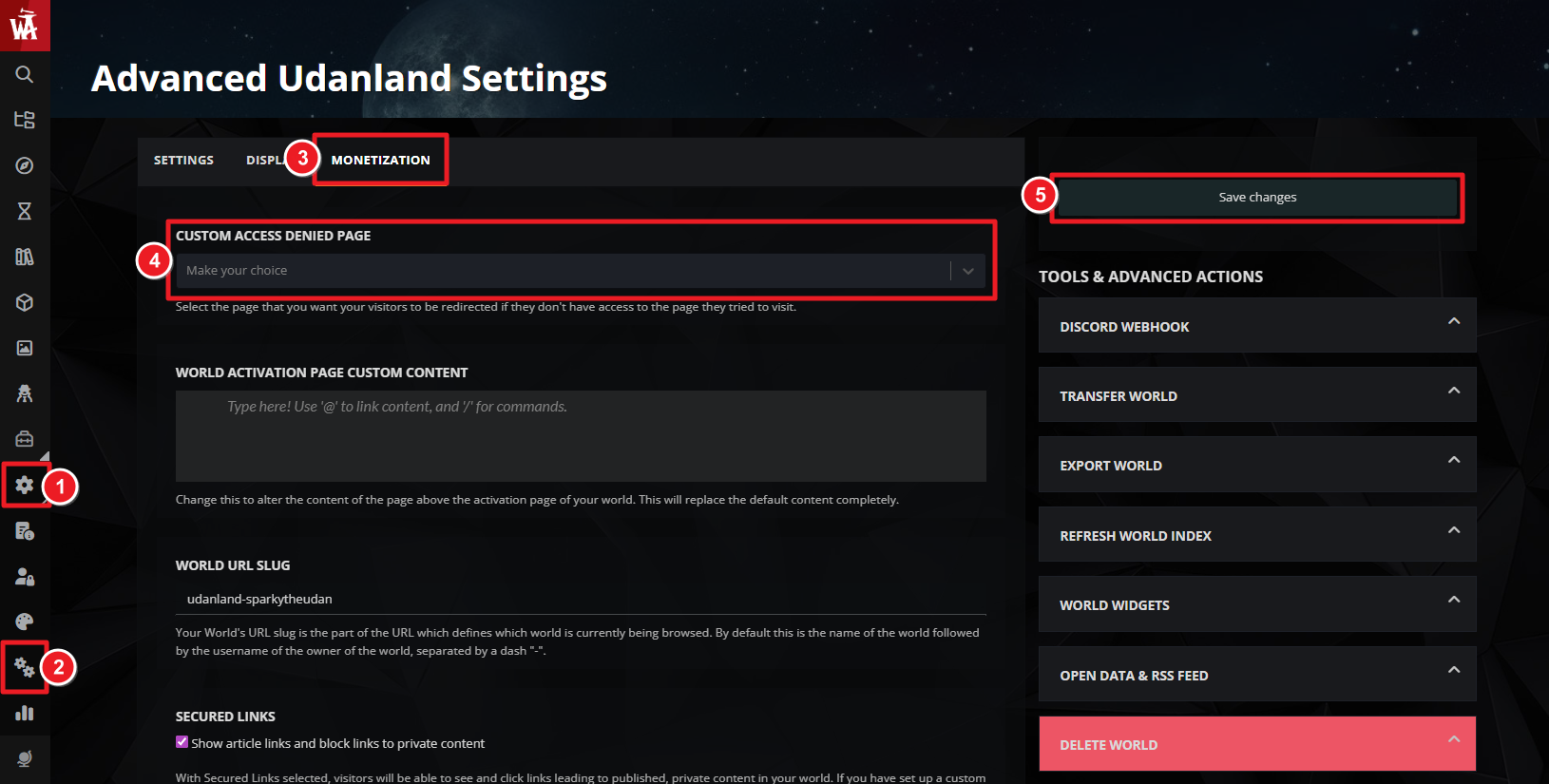
And that's it! Now, any time a user tries to access a private article, they'll se the custom access denied page instead. Since this is just a regular article, all usual formatting options are available. This is a great feature to use in combination with secured links.
For more help and information with world configuration, check the guide to world configuration.



