Not able to use Grandmaster Features
Not able to use Grandmaster Features
When I click on the Subscriber group button, I get a message saying I need to be at least a Master to use that feature. I am a Grandmaster. I click on the link to fix the error, but it doesn't. Also tried in Chrome and on mobile.
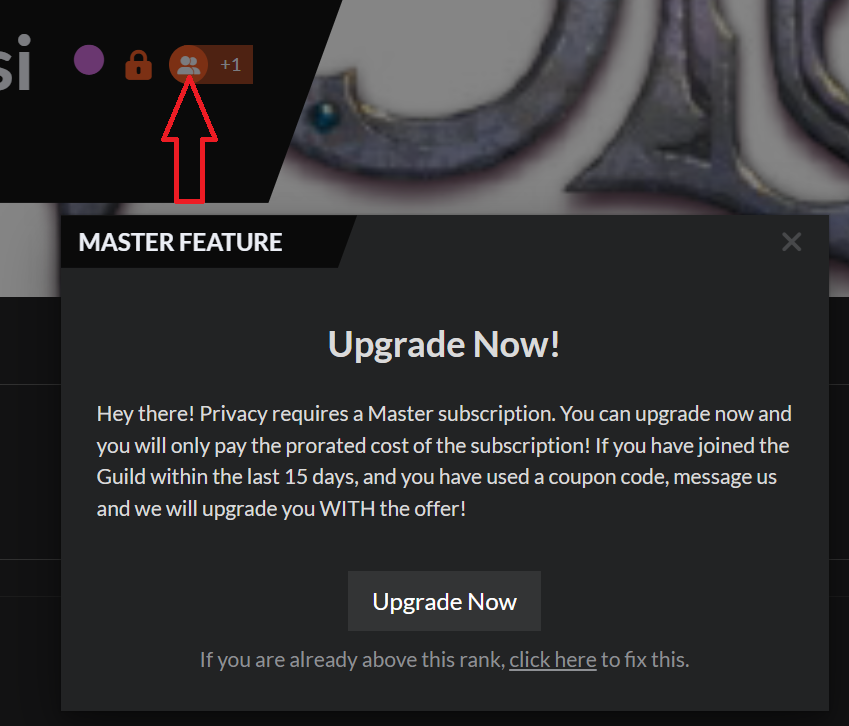
Steps to Reproduce
1. Click on Subscriber group button. 2. Get upgrade message
Operating System
WindowsBrowser
Microsoft EdgeRelated Entity
Subscriber Group buttonHistory
Hey there!
From my end the account looks to be in a good shape!
It sounds like you might be having either an issue with your cache or a Anti-Tracking / Anti-Spam / Anti-Virus
If this is a cache issue this is what might help fix it.
1. Logout from World Anvil
2. Clear you browser's cache
3. Hard Refresh your page
4. Log back in
If the issue does persist this might be an issue with an Anti-Tracking / Anti-Spam / Anti-Virus software blocking parts of world anvil
we will need to check if the issue is with the local machine
- Try disabling all software like Norton etc.
- Try using the same browser in Incognito mode (normally disabled any plugins and extensions)
- Try using a different browser
if it continues
- Use a mobile phone on a 4G/5G network so see if you can access the website with al your features activated
If you still need help please let me know
Steps I have taken to fix the error (that did not work) I logged out before each step and logged in afterwards
1. Tried a different browser (Edge vs Chrome) (wired network)
2. Tried on mobile (wi-fi)
3. Closed all windows and re-opened browser
4. Rebooted Windows PC
5. Cleared cache and cookies, then rebooted machine
6. Crtl+Shift+R
7. Closed all Anti-tracking/spam/virus software
Issue is still happening, but only with that button.
8. Incognito window
If incognito fixed the issue - the issue is an extension or plugin since this is what incognito mode DOES NOT load ;)
I tried incognito mode and it also did not work.
I just tried this in the Old Version Edit and it worked.
Find your way!
Resources
WHO WE ARE
LEGAL
Listen to our Podcast



