Black-on grey text in statblock editor is barely readable
Black-on grey text in statblock editor is barely readable
I'm editing a statblock and the text in the editor widget is black—on a charcoal grey background. It's barely readable.
I've tried switching to Light mode for my UI and it didn't help.
Steps to Reproduce
- In World Settings, set game system to include Tales of the Valiant
- Create a new statblock, selecting the template Monster (Tales of the Valiant)
- When the statblock editor opens, type in any of the editor fields, such as Description.
- The text in the editor window is black and difficult to read.
Operating System
MacOSBrowser
Apple SafariRelated Entity
I opened the statblock editor for the first time. The editor widgets look like this: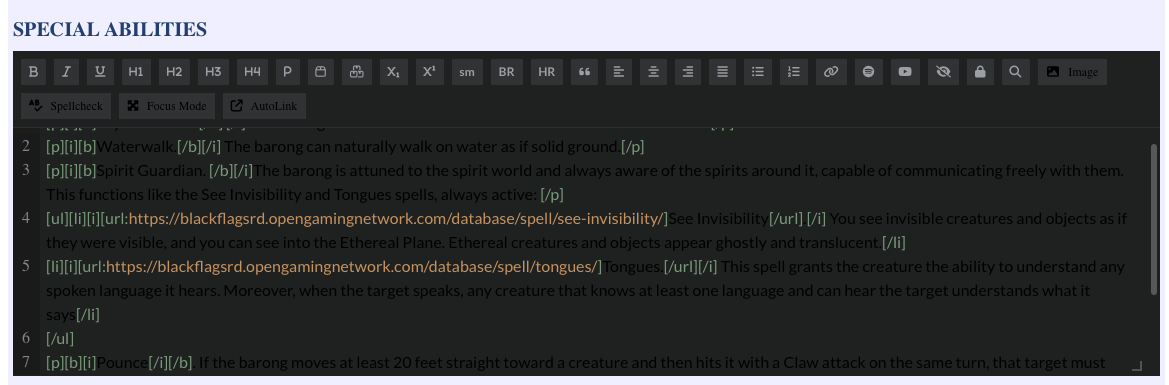
I expected text in this editor to be white or light grey for readability. The editor for the bug report works as expected, showing white text in the editor pane.
I've tried changing my UI preference to light mode, logging out, and logging back in. That didn't change the appearance of the editor widgets for this stat block.
History
Hello there!
This is a matter of the statbklock you are using in combination with the theme you have on your world and the editor you are using.
First of all Which statblock is this?
It's the Tales of the Valiant Monster statblok
I checked and fixed all 10 TOV blocks.
Thanks! I just tried a new statblock and I can confirm the editor is now working as expected. This
Find your way!
Resources
WHO WE ARE
LEGAL
Listen to our Podcast



