Available to the Master subscription tier and above. Upgrade here.
Since variables let you display the same text in multiple places, it's a great tool to stay consistent with names! Here's how to set it up:
- In the left sidebar, select Advanced Tools and then Variables to open the variables side menu.
- If you don't have one yet, create a new collection (using the + Collection button). You can call it "Names".
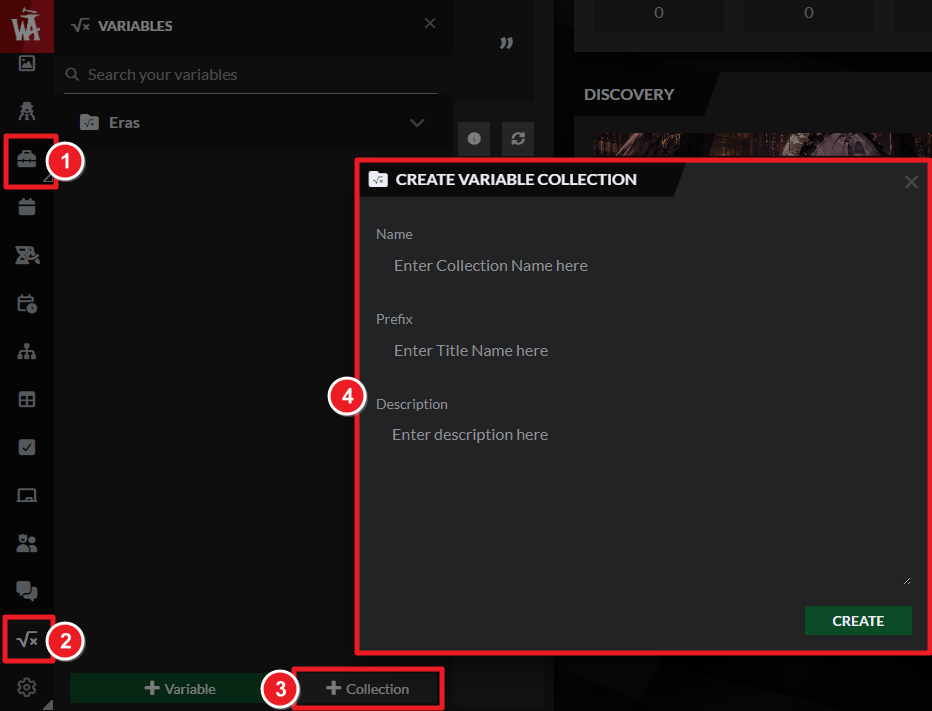
- Create a new variable in this collection with these values:
- Key: a name, title, or very short descriptor you'll remember about this character or place.
- Type: Leave it as "Term, simple".
- Title: Write in the full name of the character or place.
- Value: Leave this empty.
- Once the variable is created, click the copy button next to it and paste it in an article using the Advanced Editor.
While editing an article, you can also type a square bracket [ followed by the variable key to find it!
For example, if you have a character called Numuhukumakiaki'aialunamor who is often nicknamed Rock, you could set [var:rock] to display the character's full name.
For more ideas on using variables, check our tips for using variables, and for more help with the feature check the guide to variables.



