Available to the Master subscription tier and above. Upgrade here.
If some of your Manuscripts chapters are private, you can create custom access denied content that will be shown instead of the default message if someone tries accessing those chapters. This is especially useful if you're monetizing your Manuscript in some way, as it lets you lead your readers to your monetization platform (Patreon, Ko-fi, etc).
How to create a custom access denied page
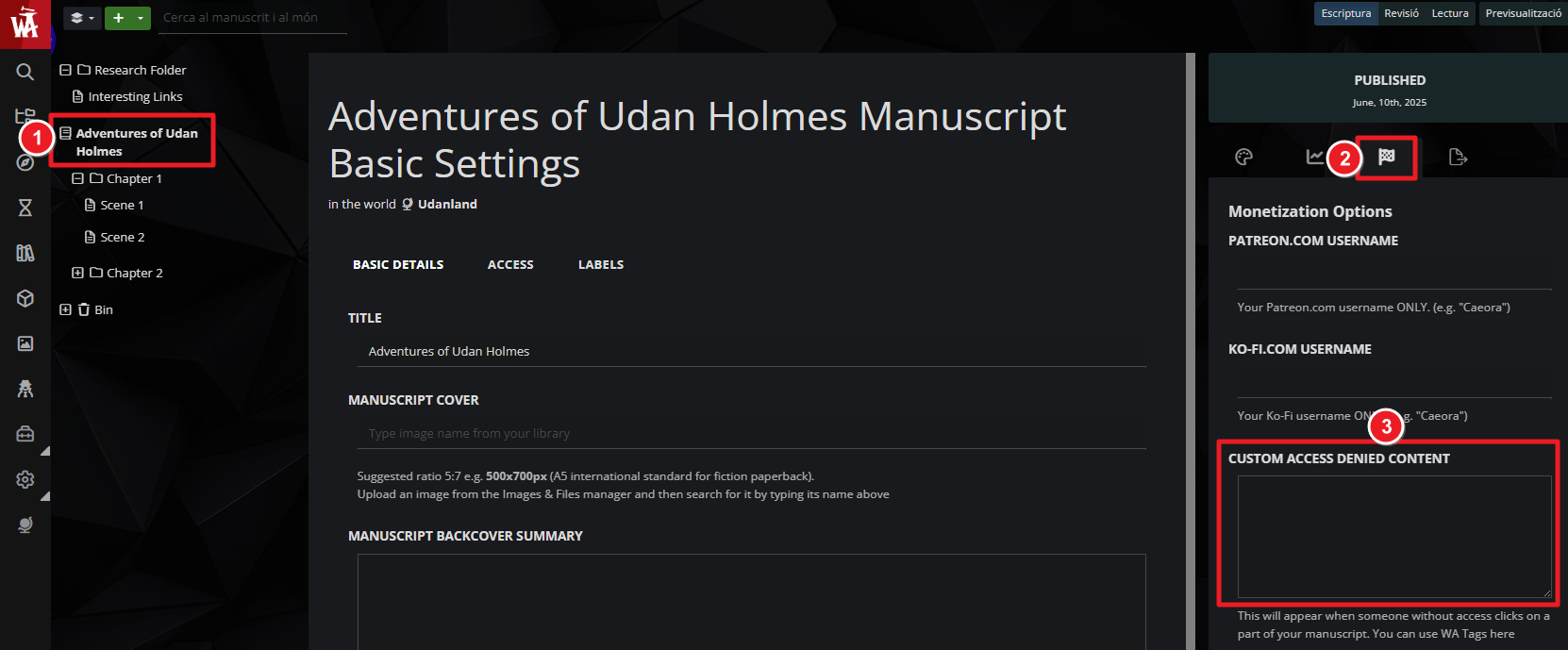
- Open your Manuscript for editing
- On the left panel, where you have the chapter and scene list, click on the title of your Manuscript.
- On the right panel, click on the chequered flag tab.
- Find the "Custom access denied content" text field.
- In that field, write the content you want to show in the access denied page for the Manuscript. The field accepts BBCode tags, so you can use formatting options like external links, headers, and more.
You can use this feature in combination with subscribers to encourage prospective readers to support you. If the private chapters are visible to subscribers, you have this information in the access denied page to encourage your readers to support your on Patreon or other sites.
For more information about Manuscripts, check the Guide to Manuscripts.



