The category system lets you organize your articles by topic. Here's how you can link directly to any category in your world!
If you're a Guild member, simply type an open bracket [ and start typing the name of the category. A drop-down will appear with an option to embed the Category Link directly.
If you're using the Visual Editor, you can just type an at @ followed by the name of the category, and select from the list.
Otherwise, follow these steps for the Advanced Editor:
- Go to the Articles interface in the sidebar.
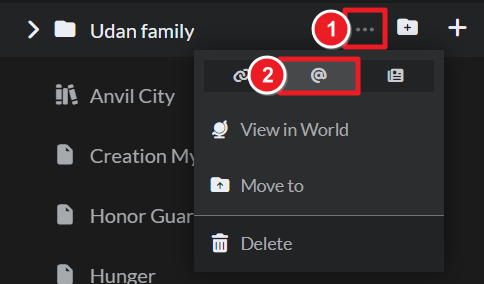
- Find the category you want to link to in the category tree on the left.
- Mouse over the category and click on the ellipsis button.
- Click on the Copy Mention button and paste anywhere with the Advanced Editor to create the link.
For more information and help with categories, check out the Guide to categories.



