Historical Events: Get an error when entering a negative number in End Year
Historical Events: Get an error when entering a negative number in End Year
When editing my Histrorical Events, if any entry had a negative number in the End Year it throws an error about it must be greater then 2 or something. Does not seem to affect the Start Year. As a workaround I edit those entries in the Timeline which does not have any errors when used.
Steps to Reproduce
Create two events in a timeline. One with a blank end year and another with a negative number in the year.
Go to Historical Events, find your entry and make any changes (other than year) for me it was adding a tag.
Erro pops up almost instantly on the one with the negaive year.
Operating System
WindowsBrowser
Microsoft EdgeRelated Entity
Historical EventsHistory
Hello there, thanks for reporting this bug! The fix is up, so let me know if you still have any further issues.
Seems fixed, I can enter a negative number, but if I try to make it the same year, but the next day (ending date) I get this error now.
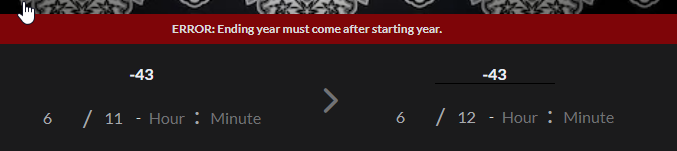
And if I remove that end year/day/month I get this (and as you can see there IS a start year.
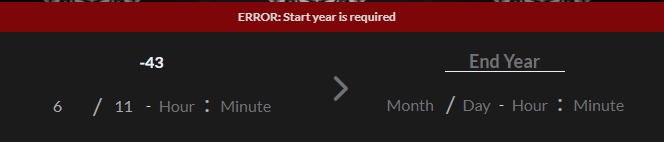
Hello Kaixabu, thanks for your quick feedback. I have pushed now some more fixes which should allow the years to be the same as long as the end date is further in time. I have also allowed an enddate to not be required, so that last error shouldn't happen either. Happy worldbuilding, and let me know if you have any further issues!
Yes all seems good.. only one small item. I had an entry I was testing and it had the end year (no day/month/etc), but I could not remove in historical events.. but could in the timeline edit.. so it is cleared now, but just FYI. And THANKS
Great to hear that things are working better now. What would happen when you tried to clear the year, would you get an error, or it literally wouldn't let you clear it, and if an error what error if you remember?
I tried removing/clearing it, the error came up immediately when the autosave seems to kick in, and when I refresh the date was still there. Not sure that helps.
Ok Kaixabu, thanks for reporting this. I am looking into it!
Hello Kaixabu, if you can, please let me know if you have experienced this error recently still.
Nope all good so far.. :)
Great, thank you~ Please report again if you end up with any issues!
Thanks again.
Find your way!
Resources
WHO WE ARE
LEGAL
Listen to our Podcast



