Session Report Dates Broken
Session Report Dates Broken
Every time I open a Session Report to edit it, the date moves back a day. So, I have a report for 11/17/2025. I open it, the date is now 11/16/2025. I open it to edit again, it is now 11/15/2025, and so forth.
Steps to Reproduce
Edit a Session Report.
Operating System
WindowsBrowser
Google ChromeRelated Entity
Session Reports
History
Hello eberg, I have so far failed to reproduce this bug - I also took a look at your account and there seems to be no way to trigger it from there or a reason why it would be account specific. Can you please try again and confirm it's still happening? If so, can you give me detailed steps for what you do to reproduce it? I have tried opening a session Report article from the sidebar -> Article & World Manager -> Session Report. I also tried it with the Old version edit interface with no success.
Okay, from this screen:
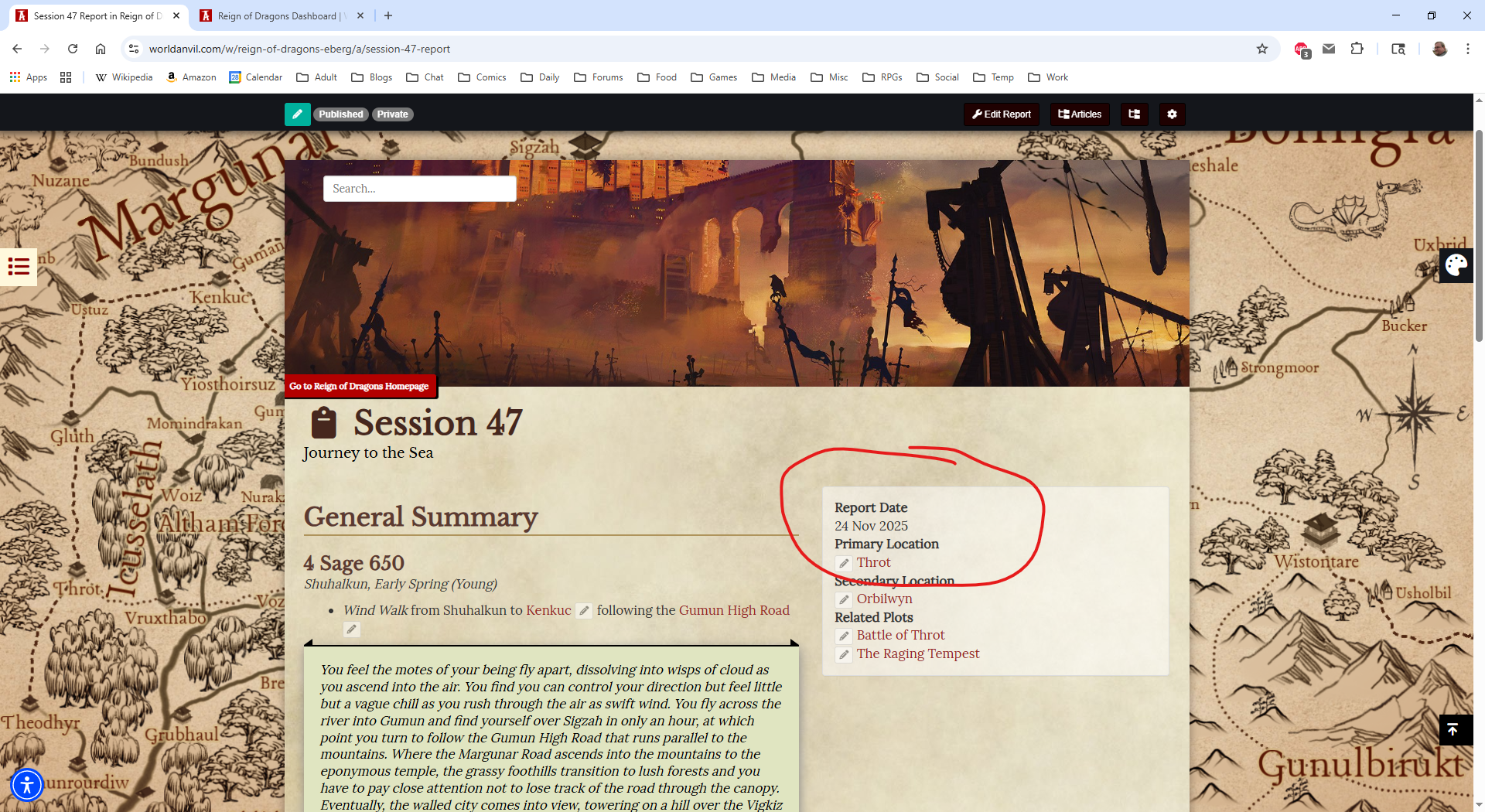
I click Edit Report in the upper right hand of the top toolbar. When the edit screen opens, note that the date has decremented:
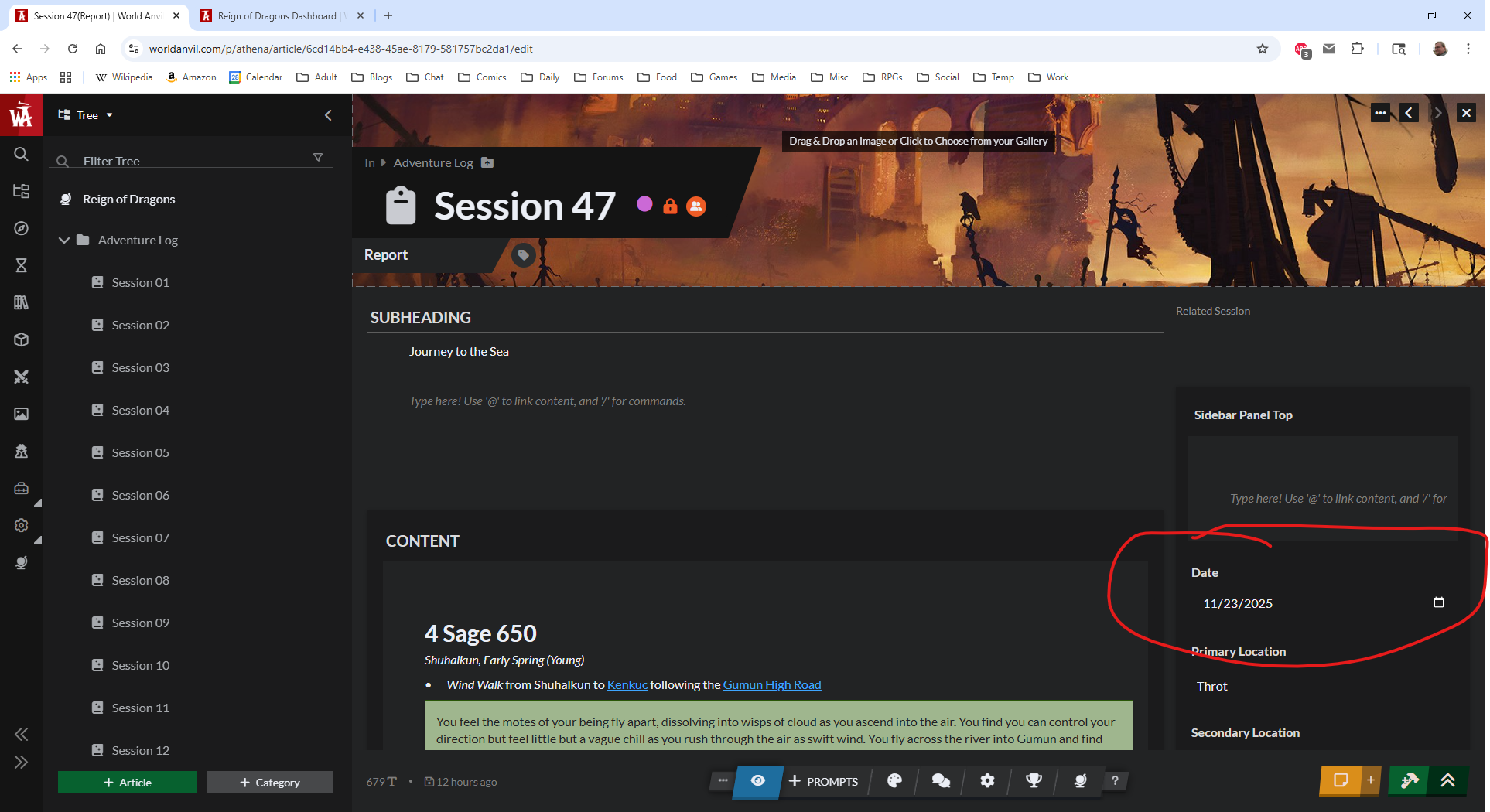
I've found the same thing happening in Edge as well. If I click "Edit Report" to edit a session report I'm currently viewing, the date decrements by 1 day. If I update anything to trigger the article to save, it saves the decremented date. If I go back to view the reportin world, then click the edit button again, it decrements again. 100% repeatable. You do have to cause the report to save for the decremented date to stick.
Not sure why it is still 'Waiting for Response', I answered.
I've been having this happen in FireFox as well! In fact the session date for our first session I noticed had for some reason updated to today's date, but the date area is not accessible in the new editor for some reason. So I updated it to the proper date (July 6, 2025), and when I looked at the session report again in the new editor after saving, it had decremented to July 5, 2025.
Having this issue as well. Every time an edit is made to a Session Report, the date of the report decreases by 1. Using Chrome.
Same thing here. I can reproduce it just by creating a Session Report and setting the report date. Every time I go to edit the page, the date goes back 1 day. Also I notice that when I view any page in the editor, it immediately auto-saves the page even though I haven't touched anything yet. Not sure if that's related to this bug, but it shows that something is getting changed just by looking at the page in the editor. Also I will bet a beer that this has something to do with time zones.
More info: I have verified that the problem does not happen if I use Old Version Edit.
If I'm careful to never view the page in the "new" editor but only with Old Version Edit, then:
- It doesn't auto-save as soon as the editor opens
- The Report Date is not disturbed
Any work on this? It's been two months since I answered your question and many people confirm it is happening, but it is still marked 'Waiting for Response'.
Hey, I have read your response I just didn't remove the tag. And I'm sorry it's taking a while, we are still investigating this issue when we are able but we haven't been able to find the underlying cause yet. Thanks for your patience and I will let you know as soon as I have some news!
It's been half a year. Any progress?
Hey eberg, I'm sorry to report that throughout this time I hadn't managed to reproduce the bug and couldn't find any problems with the code so I had no way of resolving this. Giving it another look now, there might be a reason it's happening for you and not for me so consistently - can you tell me what timezone you're in?
It isn't just me. Look at the comments above, four other people are reporting this both in Chrome and Edge. I'm EST/EDT.
I have read the comments, doesn't mean I could do much more to help without seeing the problem for myself - I managed to pinpoint the issue which I can't actually see unless I change my timezone on my computer (WorldAnvil uses the UK timezone by default so European users can't encounter this issue and that was the problem after all in the edit form).
I have deployed a fix, please give it a try and let me know if you still encounter the date changing.
Still occurring.
I tracked down another instance of the issue happening and have fixed it as well, hopefully now dates will remain as set - please test again and let me know!
Yep, that fixed it. Thanks!
Great, thanks for the confirmation, I will be closing this report now as resolved.
Find your way!
Resources
WHO WE ARE
LEGAL
Listen to our Podcast



