Articles with diacritic letters can't be mentioned
Articles with diacritic letters can't be mentioned
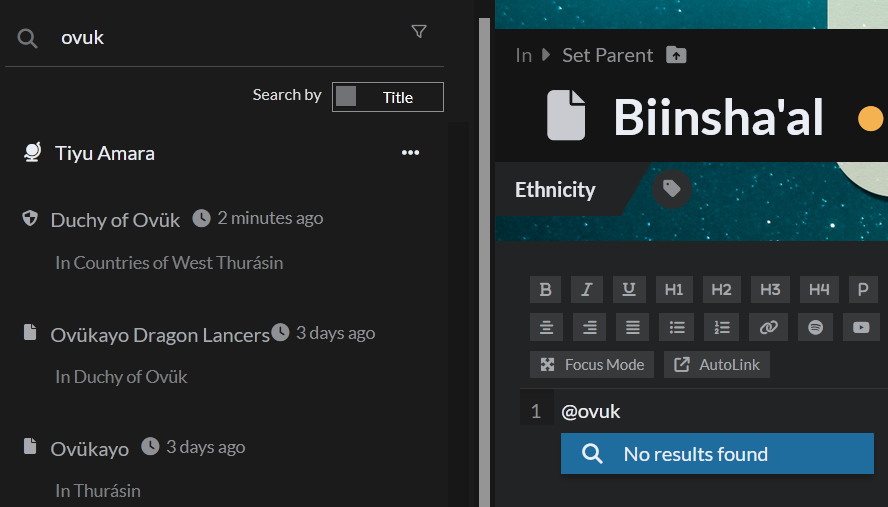
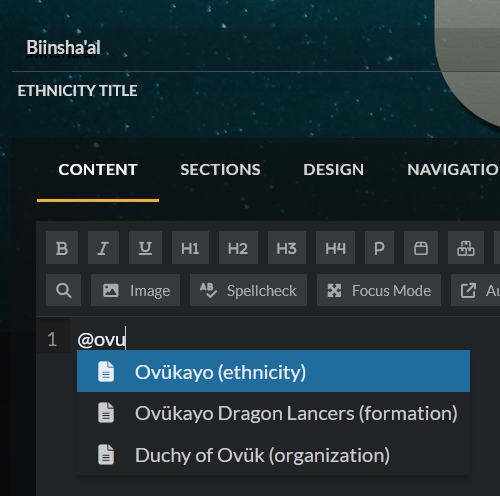
If you have an article with accented letters (e.g. á, è, ü), the mention behaviour in the new editor isn't what you expect. For example: I have articles with the word "Ovük". In the old editor, typing 'ovu' would return these articles. In the new editor, this does not happen, making it impossible to mention the article without typing the diacritics (changing keyboard, copying the letters from elsewhere), slowing down the writing process. While this can be worked around in some instances (finding a 3 letter long sequence of 'standard' characters in an article name), not all articles may have these. See images below - the first shows the new editor, and how typing 'ovuk' doesn't show the three articles in the sidebar despite them being searchable in Athena. The second shows the same articles being visible from the old editor.
Steps to Reproduce
1. Create an article with diacritic letters in the title 2. Open another article in Athena 3. Try to @ mention the first article without typing diacritics
Operating System
WindowsBrowser
FirefoxRelated Entity
Mentioning articles in the new Athena editorHistory
Find your way!
Resources
WHO WE ARE
LEGAL
Listen to our Podcast



