Prompt drop-down lists in modal editor display off-white text on white background
Prompt drop-down lists in modal editor display off-white text on white background
When using the modal editor, after enabling prompts that look up an article or have a pre-populated list, the drop down list box looks empty. However, you can select items. On close inspection, the font seems to be nearly white on a white background.
I confirmed the same behavior in both Chrome and Edge.
Steps to Reproduce
- Articles & Categories
- Click article title to start pop-up editor
- Enable a prompt that uses a drop down (Ex: Current location for a character)
- Click the dropdown button
Operating System
WindowsBrowser
Google ChromeHistory
Hey Songwind, could you share a screenshot of what you see? The dropdown options are supposed to be white text on back and this doesn't change depending on the theme you set on the website. Have you added any custom CSS?
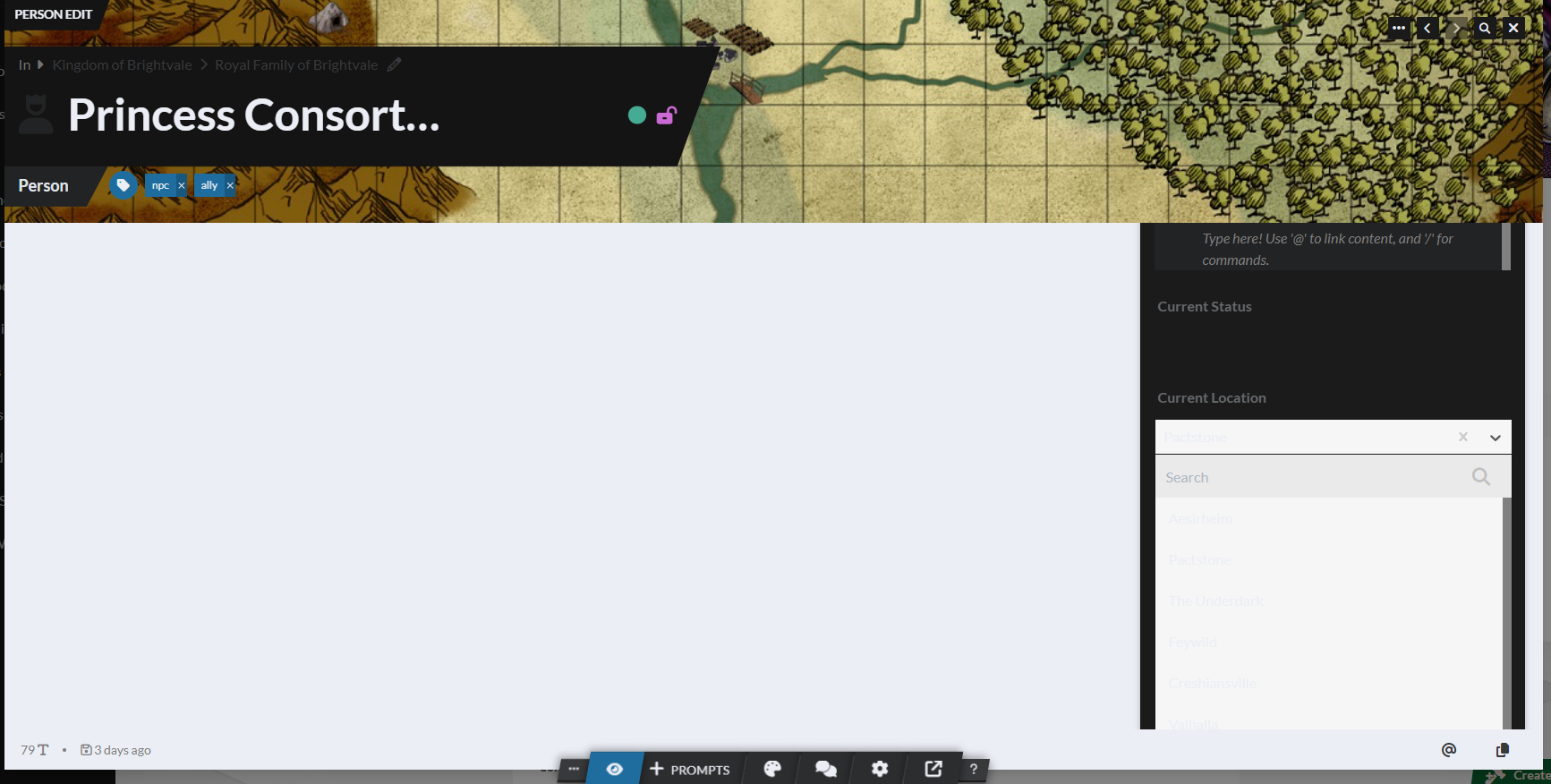
Here you go. There are multiple locations that could be picked, but the list looks empty. If I click in the list, I'll get a selection, but I can't see what it is until after it's clicked.
Thanks for the information, I will be looking into it!
Hey Songwind, I took a look and this and unless you have specifically set custom CSS on the styling setting, it looks to be the result of styles being applied from outside WorldAnvil - it could be the browser or a specific plugin overriding the colors of our interface. Try using the website on incognito mode or a different browser to check if the colors are looking correctly.
No change in incognito mode.
Songwind, can you try using another browser and let me know if the colors are still the same? Also, for the current browser you're using you can try disabling your plug-ins and revert any custom styling settings the browser might have - these might bring the colors back to what they're supposed to be. But your World Anvil account settings are not the issue, I have confirmed that
I have the same behavior in Microsoft Edge. It also doesn't work with plugins disabled.
Hello Songwind, can you let me know if you are still experiencing this issue? Thank you!
I have exactly the same issue and I also tested with Chrome and Edge, and in Incognito mode. In my timelines when I click on a dropdown-box I can see faint outlines of the options and can click and select from the list, but I can barely see anything.
I would add that the same issue persist on brand-new Firefox install with no additional configuration. I work around the issue by turning on Dark Mode, which completely solves it
I too am experiencing this issue. Changing browser or light/dark mode does not seem to solve the issue
Find your way!
Resources
WHO WE ARE
LEGAL
Listen to our Podcast



