New Editor shifts text when clicking in focus, hampering ability to copy in code or notes made while offline.
New Editor shifts text when clicking in focus, hampering ability to copy in code or notes made while offline.
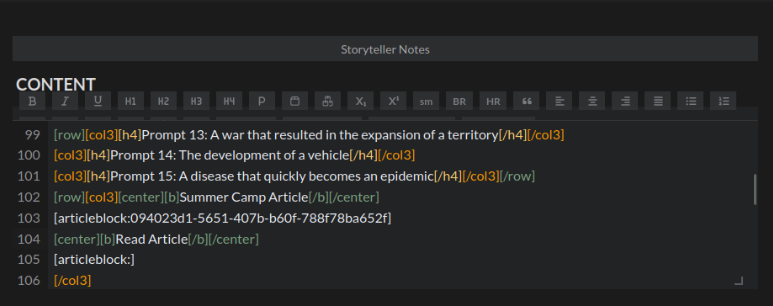
When copying prompt text (the "Somewhere in your world describe..." prompts) into my Summer Camp 2026 article repository, I was repeatedly unable to click the right place, as the text is displaced down several lines when the text window gains focus.
Focused*
Not Focused
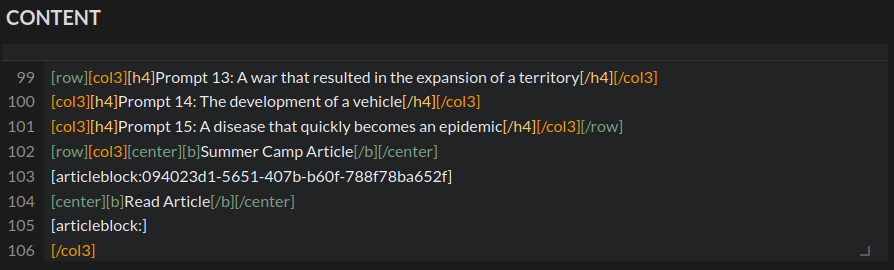
*Apologies for the menu being partly squished in the focused screenshot. The text window briefly lost focus regardless of what I did to take the screenshot, resulting in a half-hidden set of toolbar buttons each time. In normal conditions, the text block would be somewhat lower as the toolbar would be fully opened.
This is, admittedly a very minor problem, but it does add what I must assume would be unintended friction in certain processes that was not present in the old editor with its always-open toolbar. (I also use copy/paste for my standard article formatting, copying words from foreign languages I looked up, and CSS solutions recommended by people on the discord.)
Steps to Reproduce
Operating System
LinuxBrowser
FirefoxRelated Entity
Text windows in the new editor, using Eudlid? The text editing style where BBCode is typed and visible. Should be able to tell from the picture above.History
Find your way!
Resources
WHO WE ARE
LEGAL
Listen to our Podcast



