Timelines can get long in expansive worlds, so use this guide to quickly find your way around the history of your world (or someone else's)!
Minimap and quick-jump arrows
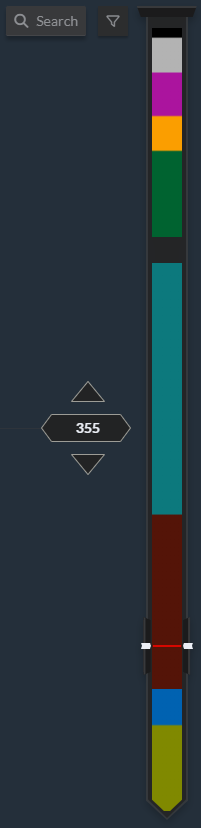
On the right side of the screen, you will see these two features, which you can use to jump around in the timeline if you aren't looking for a specific event:
- The minimap shows a preview of all eras with their colors. The rectangle highlights your current position in the timeline, and you can use it like a scrollbar: click anywhere on the minimap, or drag the rectangle up and down, to jump to a specific place.
Note that the minimap is only available in Timescale Mode. If you're using a List Mode timeline, only the quick-jump arrows are available. - Click the quick-jump arrows, next to the minimap, to jump straight to the next or previous event. The number between them is the year that is currently centered on your screen (or, in list mode, the start year of the selected event).
Search and filters
If you know what you're looking for, use the search bar. It works as you would expect: type anything to get a list of all events with that word in their title.
The filter button next to it will open a small menu where you can filter out events by a number of settings:
- Guild-only Subscriber groups: hide or show events depending on their visibility settings.
- Tags: these are tags you add when creating an event. Check the advanced event options for more information.
- Type of Events: there is a number of pre-defined event types that you can choose from. Only event types present in the timeline are displayed in the filters list.
- Importance of Events: similarly, events can have different importance levels; use this option to sort through them.
You can click the eye icon next to each filter to hide or show those events.



