Available to the Master subscription tier and above. Upgrade here.
While Manuscripts lets you publish your novels and stories on World Anvil, you can also export your Manuscript for back-up purposes or to publish it somewhere else. Here's how!
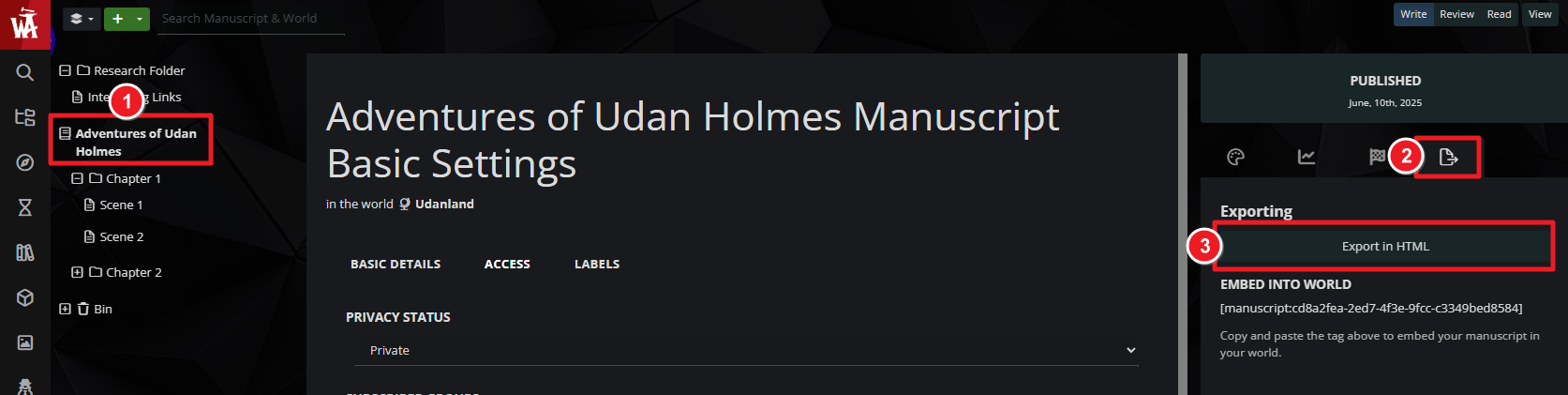
- In your Manuscript, make sure the final version of your story is all nested under the name of your Manuscript. All chapters and scenes outside of that will be ignored in the export.
- Click on the title of the Manuscript on the left panel.
- On the right panel, click the Export tab.
- There, click the "Export in HTML" button.
You can then save that page to PDF (using your browser's print-to-pdf functionality), copy-paste it into a Word document, or using an epub or mobi converter tool to have it i na standard ebook format.
For more information about Manuscript, check the Guide to Manuscripts.



